
Text Reverser Guide: Reverse Text, Words and Lines
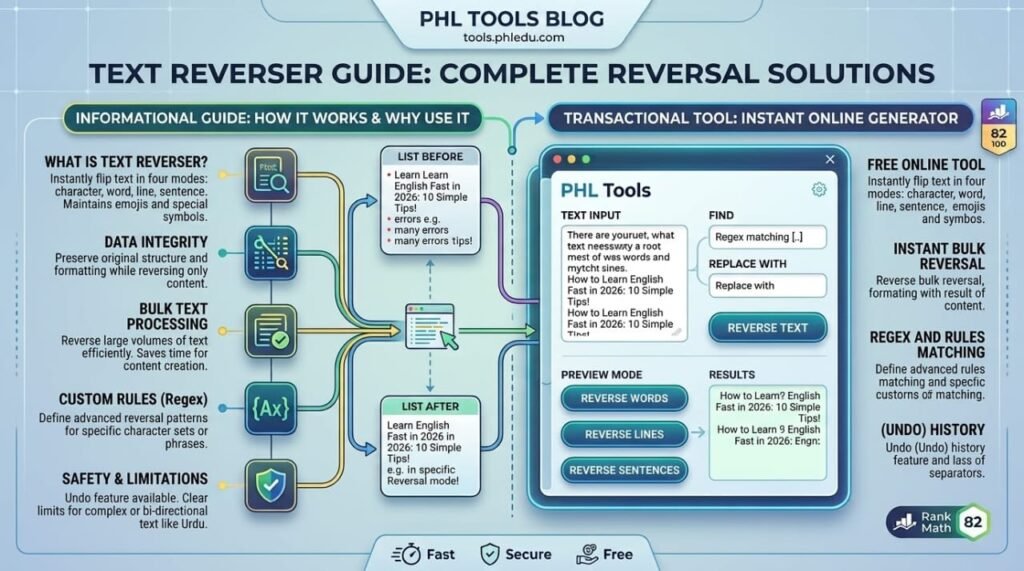
A text reverser flips your text the way you choose: letter by letter, word by word, line by line or sentence by sentence. Paste your text into the free PHL Tools Text Reverser, pick a mode and copy the result. It keeps emoji and accented letters whole, so nothing breaks into strange symbols. This complete guide explains all four modes with the same example, shows what each one is good for, and covers the limits you should know, including what happens with Urdu text.
What the Text Reverser Does
Reversing text sounds simple, but there are really four different things people mean by it. Do you want the letters backwards, the words in the opposite order, the lines upside down, or the sentences swapped? The PHL Tools Text Reverser has a separate mode for each, so you get exactly what you need.
It reverses what a reader sees as characters. That means an emoji, a flag or a letter like é stays in one piece instead of being split into broken symbols.
Step by Step: Reverse Your Text
- Open the Text Reverser.
- Type or paste text into Your text.
- Choose what to reverse under What to reverse: Characters, Word order, Line order or Sentence order.
- The result appears immediately in Reversed text.
- Press Copy result or Download .txt.
The next sections use this same input for every mode so you can compare:
Learning English is fun. Practice every day.
Never give up!
(see each mode below)
Mode 1: Characters
The whole text is written backwards, including the line breaks. The last character becomes the first.
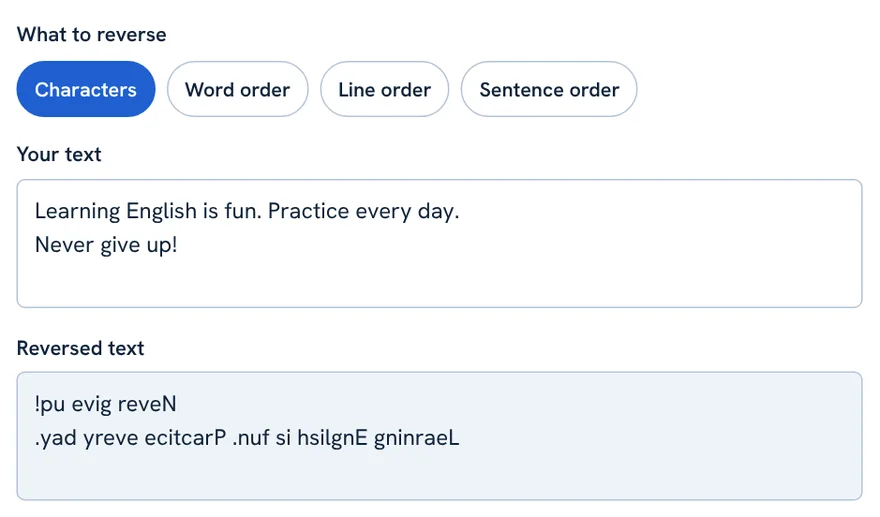
Learning English is fun. Practice every day.
Never give up!
!pu evig reveN
.yad yreve ecitcarP .nuf si hsilgnE gninraeL
Use it for: mirror-text puzzles, palindrome checks (a word that reads the same backwards), and fun social captions. Notice that the two lines also swapped places, because the line break is reversed too.
Mode 2: Word Order
The words on each line are reversed, but each word keeps its letters in the right order and the lines stay where they are.
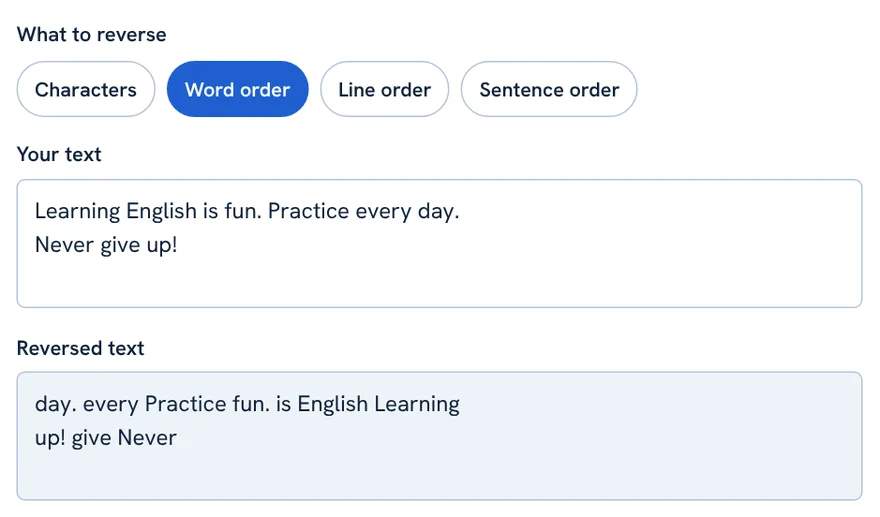
Learning English is fun. Practice every day.
Never give up!
day. every Practice fun. is English Learning
up! give Never
Use it for: testing how a sentence reads in reverse, language-learning games, and checking word lists.
Mode 3: Line Order
The last line becomes the first and the first becomes the last. The text inside each line is untouched.
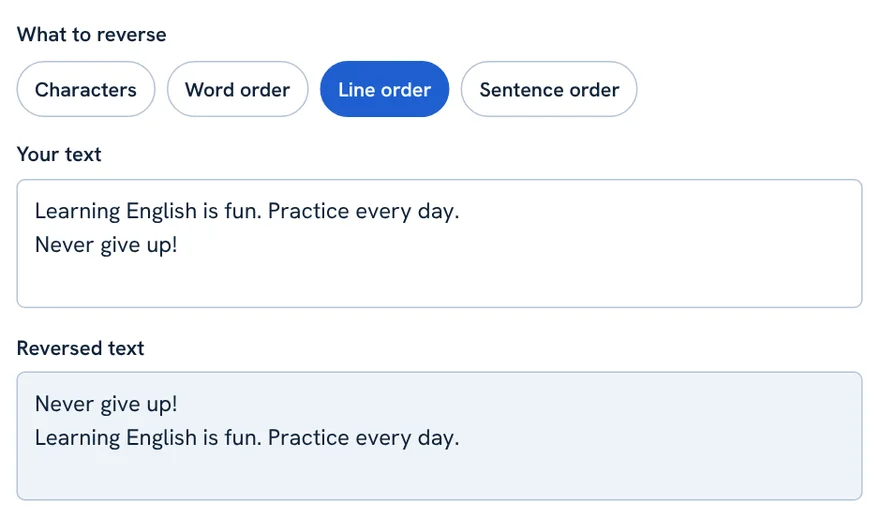
Learning English is fun. Practice every day.
Never give up!
Never give up!
Learning English is fun. Practice every day.
Use it for: turning a newest-first list into oldest-first, reversing a numbered list, or flipping a log file.
Mode 4: Sentence Order
The sentences on each line swap places and keep their own punctuation. Sentences are detected at . ! ? … and the Urdu ۔ and ؟ marks.
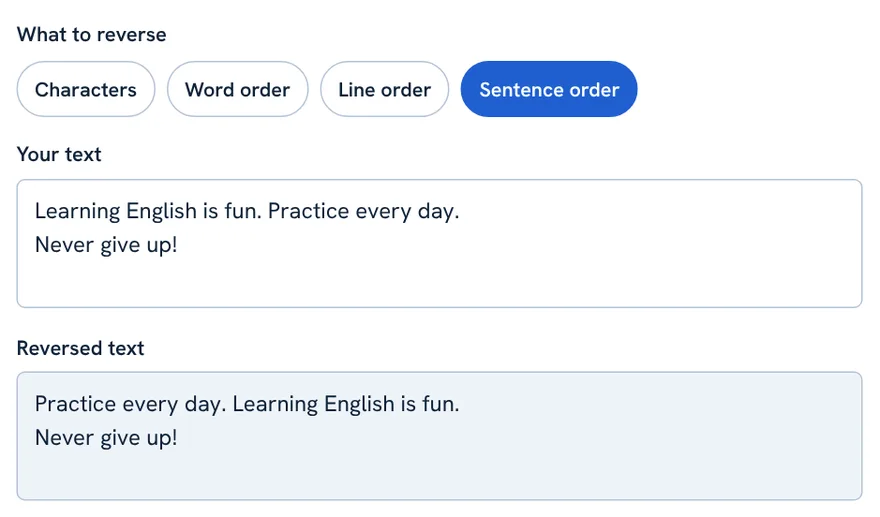
Learning English is fun. Practice every day.
Never give up!
Practice every day. Learning English is fun.
Never give up!
Use it for: shuffling the order of ideas in a paragraph, or quickly testing a different flow. Abbreviations such as Dr. look like the end of a sentence, so check the output when your text has them.
Which Mode Should I Choose?
| I want to… | Choose |
|---|---|
| Make mirror writing or check a palindrome | Characters |
| Read a sentence word by word backwards | Word order |
| Flip a list upside down | Line order |
| Swap the order of sentences in a paragraph | Sentence order |
The Buttons
- Copy result: copies the reversed text (Ctrl + Enter, or Cmd + Enter on Mac).
- Select result: highlights the output.
- Download .txt: saves the result as a text file.
- Use result as input: moves the result into the input. Reverse a text twice with the same mode to get the original back.
- Paste: pastes from your clipboard.
- Try an example: fills the box with sample text.
- Clear all: empties both boxes.
Emoji, Accents and Urdu: Know the Limits
- Emoji and accents: they stay whole because the tool reverses user-perceived characters. Very new emoji or unusual sequences may be handled differently in older browsers.
- Urdu and Arabic: these scripts are written right to left and their letters join. Reversing the character order changes the stored order of letters, so the result is only useful if you really want the letters in the opposite order. Word, line and sentence modes are far more useful for Urdu.
- Privacy: everything runs in your browser. Your text is not uploaded.
FAQ
What is the difference between reversing characters and word order?
Characters reverses every letter, so Hello becomes olleH. Word order keeps each word intact and only reverses their positions, so one two becomes two one.
How do I reverse the order of lines?
Choose Line order. The last line becomes the first and the first becomes the last, while each line stays unchanged.
Does the text reverser work with emoji?
Yes. Emoji, flags and accented letters are treated as whole characters, so they are not split into broken pieces.
Can I reverse Urdu text?
Word, line and sentence order work well. Character reversal changes the order of Urdu letters, which is rarely what you want.
Can I undo a reversal?
Reverse the result again with the same mode, or use Use result as input and apply the same mode a second time.
Related tool guides
ٹیکسٹ ریورسر آپ کے متن کو آپ کی مرضی کے انداز میں الٹ دیتا ہے: حرف بہ حرف، لفظ بہ لفظ، لائن بہ لائن یا جملہ بہ جملہ۔ متن PHL Tools کے مفت ٹیکسٹ ریورسر میں پیسٹ کریں، موڈ چنیں اور نتیجہ کاپی کریں۔ ایموجی اور اعراب والے حروف سالم رہتے ہیں، اس لیے کچھ عجیب علامات میں نہیں ٹوٹتے۔ اس مکمل گائیڈ میں چاروں موڈ ایک ہی مثال سے سمجھائے گئے ہیں، ہر ایک کا فائدہ بتایا گیا ہے، اور ان حدود کا ذکر ہے جو آپ کو جاننی چاہییں، بشمول اردو متن کا معاملہ۔
What the Text Reverser Does
متن الٹنا سادہ لگتا ہے مگر لوگ اس سے چار مختلف باتیں مراد لیتے ہیں۔ کیا آپ حروف الٹے چاہتے ہیں، الفاظ الٹی ترتیب میں، لائنیں الٹی، یا جملے آپس میں بدلے ہوئے؟ PHL Tools کے ٹیکسٹ ریورسر میں ہر کام کا الگ موڈ ہے، اس لیے آپ کو بالکل وہی ملتا ہے جو چاہیے۔
یہ وہ چیز الٹتا ہے جو قاری کو حرف نظر آتی ہے۔ یعنی ایموجی، جھنڈا یا é جیسا حرف ٹوٹی ہوئی علامتوں میں بٹنے کے بجائے ایک ٹکڑے میں رہتا ہے۔
Step by Step: Reverse Your Text
- ٹیکسٹ ریورسر کھولیں۔
- متن Your text میں لکھیں یا پیسٹ کریں۔
- What to reverse کے نیچے چنیں کیا الٹنا ہے: Characters، Word order، Line order یا Sentence order۔
- نتیجہ Reversed text میں فوراً آ جاتا ہے۔
- Copy result یا Download .txt دبائیں۔
آگے ہر موڈ میں یہی ان پٹ استعمال کیا گیا ہے تاکہ آپ موازنہ کر سکیں:
Learning English is fun. Practice every day.
Never give up!
(ہر موڈ نیچے دیکھیں)
Mode 1: Characters
پورا متن الٹا لکھا جاتا ہے، لائن بریک سمیت۔ آخری حرف پہلا بن جاتا ہے۔
Learning English is fun. Practice every day.
Never give up!
!pu evig reveN
.yad yreve ecitcarP .nuf si hsilgnE gninraeL
استعمال: آئینے والی پہیلیاں، palindrome کی جانچ (وہ لفظ جو الٹا بھی وہی پڑھا جائے) اور تفریحی سوشل کیپشن۔ دھیان دیں کہ دونوں لائنیں بھی جگہ بدل گئیں کیونکہ لائن بریک بھی الٹ جاتا ہے۔
Mode 2: Word Order
ہر لائن کے الفاظ الٹ جاتے ہیں، مگر ہر لفظ کے حروف درست ترتیب میں رہتے ہیں اور لائنیں اپنی جگہ رہتی ہیں۔
Learning English is fun. Practice every day.
Never give up!
day. every Practice fun. is English Learning
up! give Never
استعمال: جملہ الٹی ترتیب میں کیسا پڑھا جاتا ہے یہ آزمانا، زبان سیکھنے کے کھیل اور الفاظ کی فہرستوں کی جانچ۔
Mode 3: Line Order
آخری لائن پہلی بن جاتی ہے اور پہلی آخری۔ ہر لائن کے اندر کا متن نہیں بدلتا۔
Learning English is fun. Practice every day.
Never give up!
Never give up!
Learning English is fun. Practice every day.
استعمال: نئی سے پرانی فہرست کو پرانی سے نئی بنانا، نمبر والی فہرست الٹنا یا لاگ فائل پلٹنا۔
Mode 4: Sentence Order
ہر لائن کے جملے جگہ بدل لیتے ہیں اور اپنے رموزِ اوقاف رکھتے ہیں۔ جملے . ! ? … اور اردو کے ۔ اور ؟ پر پہچانے جاتے ہیں۔
Learning English is fun. Practice every day.
Never give up!
Practice every day. Learning English is fun.
Never give up!
استعمال: پیراگراف میں خیالات کی ترتیب بدلنا یا نیا بہاؤ جلدی آزمانا۔ Dr. جیسے مخفف جملے کا اختتام لگتے ہیں، اس لیے ایسے متن میں نتیجہ دیکھ لیں۔
Which Mode Should I Choose?
| میں چاہتا ہوں… | چنیں |
|---|---|
| آئینے والی تحریر یا palindrome کی جانچ | Characters |
| جملہ لفظ بہ لفظ الٹا پڑھنا | Word order |
| فہرست الٹنا | Line order |
| پیراگراف میں جملوں کی ترتیب بدلنا | Sentence order |
The Buttons
- Copy result: الٹا متن کاپی کرتا ہے (Ctrl + Enter، میک پر Cmd + Enter)۔
- Select result: آؤٹ پٹ ہائی لائٹ کرتا ہے۔
- Download .txt: نتیجہ ٹیکسٹ فائل میں محفوظ کرتا ہے۔
- Use result as input: نتیجے کو ان پٹ میں لے جاتا ہے۔ ایک ہی موڈ سے دو بار الٹیں تو اصل متن واپس آ جاتا ہے۔
- Paste: کلپ بورڈ سے پیسٹ کرتا ہے۔
- Try an example: خانے میں نمونہ متن بھرتا ہے۔
- Clear all: دونوں خانے خالی کرتا ہے۔
Emoji, Accents and Urdu: Know the Limits
- ایموجی اور اعراب: یہ سالم رہتے ہیں کیونکہ ٹول وہ حروف الٹتا ہے جو صارف کو ایک حرف نظر آتے ہیں۔ بہت نئے ایموجی یا غیر معمولی ترتیبیں پرانے براؤزر میں مختلف طرح سنبھالی جا سکتی ہیں۔
- اردو اور عربی: یہ رسم الخط دائیں سے بائیں لکھے جاتے ہیں اور ان کے حروف جڑتے ہیں۔ حروف کی ترتیب الٹنے سے محفوظ ترتیب بدل جاتی ہے، اس لیے نتیجہ صرف تب کام کا ہے جب آپ واقعی حروف الٹی ترتیب میں چاہتے ہوں۔ اردو کے لیے Word، Line اور Sentence موڈ کہیں زیادہ مفید ہیں۔
- پرائیویسی: سب کچھ آپ کے براؤزر میں چلتا ہے۔ متن اپلوڈ نہیں ہوتا۔
FAQ
Characters اور Word order میں کیا فرق ہے؟
Characters ہر حرف الٹتا ہے، یعنی Hello سے olleH بنتا ہے۔ Word order ہر لفظ سالم رکھتا ہے اور صرف الفاظ کی جگہیں الٹتا ہے، یعنی one two سے two one۔
لائنوں کی ترتیب کیسے الٹیں؟
Line order چنیں۔ آخری لائن پہلی اور پہلی آخری بن جاتی ہے، جبکہ ہر لائن جوں کی توں رہتی ہے۔
کیا ایموجی کے ساتھ ٹیکسٹ ریورسر چلتا ہے؟
جی ہاں۔ ایموجی، جھنڈے اور اعراب والے حروف مکمل حرف سمجھے جاتے ہیں، اس لیے ٹوٹتے نہیں۔
کیا اردو متن الٹ سکتے ہیں؟
Word، Line اور Sentence order اچھے چلتے ہیں۔ Characters سے اردو حروف کی ترتیب بدل جاتی ہے جو شاذ ہی مطلوب ہوتی ہے۔
Related tool guides
More tool guides
Roman Urdu to Urdu Converter
Type Roman Urdu, get Urdu script. Click any word to pick another spelling.
Word Counter
Count words, characters, sentences and paragraphs, with reading time and keyword frequency.
Case Converter
Change text to UPPERCASE, lowercase, Title Case, camelCase, snake_case and more.