
Word Counter: Count Words, Characters, Reading Time Guide
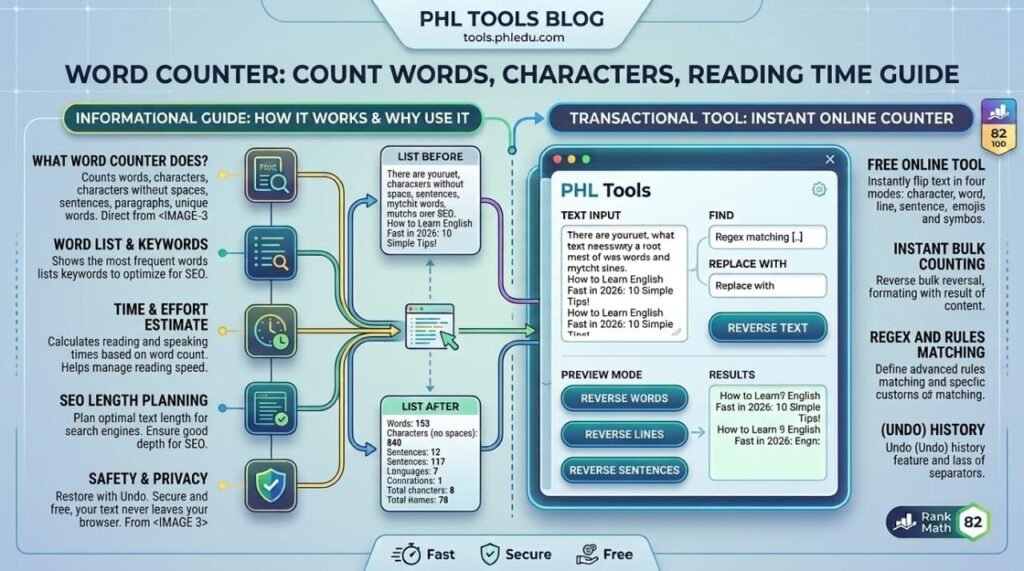
A word counter tells you how long your text is the moment you paste it, and the free PHL Tools Word Counter goes further. It shows words, characters, sentences, paragraphs, unique words, reading time and speaking time, and it lists the words you repeat most. This complete guide explains every number, every option and every button, so you can hit an essay limit, write the right length for SEO and avoid overusing a keyword. It works with English and Urdu, and your text never leaves your browser.
What the Word Counter Does
Most word counters give you one number. This one gives you a full picture of your writing in one place:
- Totals: words, characters, characters without spaces, sentences, paragraphs, lines and unique words.
- Time: how long the text takes to read silently and to say aloud.
- Keyword frequency: which single words, two-word phrases or three-word phrases you repeat, and how much of the text they make up.
Everything updates live as you type, so you can edit and watch the numbers change.
Step by Step: Count Your Text
- Open the Word Counter.
- Type or paste your text into the big box. You can also press Paste to take text from your clipboard, or Try an example to see sample numbers.
- Read the totals directly under the box.
- Press Copy summary if you want the totals as text to paste into a report or message.
- Press Clear all to start again.
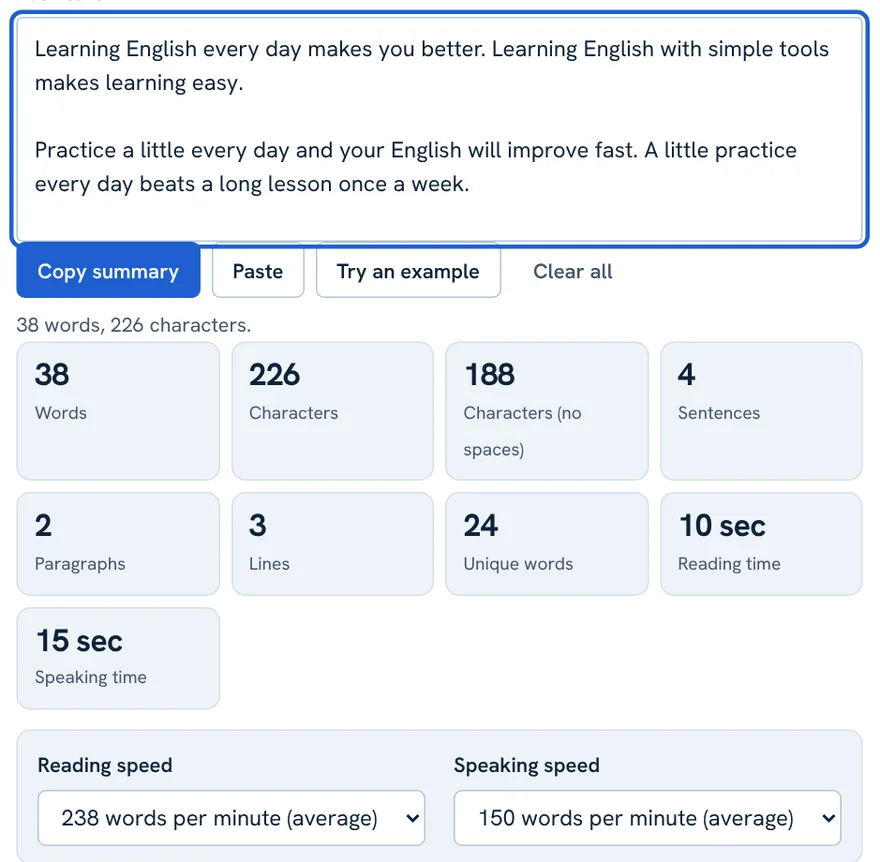
In this example the text has 38 words, 226 characters (188 without spaces), 4 sentences, 2 paragraphs and 24 unique words. Reading it takes about 10 seconds and saying it aloud about 15 seconds.
What Each Number Means
| Number | How it is counted |
|---|---|
| Words | A run of letters, digits and combining marks. An apostrophe or hyphen between letters keeps the word together, so don’t and well-known each count as one word. Standalone punctuation is not a word. |
| Characters | Letters, digits, punctuation, spaces and line breaks. An emoji or accented letter counts once. |
| Characters (no spaces) | The same, without spaces and line breaks. Useful for limits such as meta descriptions or SMS. |
| Sentences | Text ending with . ! ? … or the Urdu ۔ and ؟, or a line break. An abbreviation like Dr. can add an extra sentence. |
| Paragraphs | Blocks of text separated by at least one blank line. |
| Lines | Every line of text, separated by a line break. |
| Unique words | Different words after ignoring capital letters. |
Reading Time and Speaking Time
Reading time is the word count divided by a reading speed. The tool starts with 238 words per minute, a commonly used average for adults reading silently in English. Speaking time uses 150 words per minute.
Use the two menus under the totals to change the speed:
- Reading speed: 180 (slow), 238 (average) or 300 (fast) words per minute.
- Speaking speed: 110 (slow), 150 (average) or 180 (fast) words per minute.
Speakers planning a speech should use the speaking time. Bloggers who show “min read” should use the reading time. Real speeds vary from person to person, so treat the result as an estimate.
Keyword Frequency: Spot Repeated Words
Scroll down to Keyword frequency to see which words you use most. This is a quick way to find a word you have repeated too often, or to check that your main keyword appears naturally.
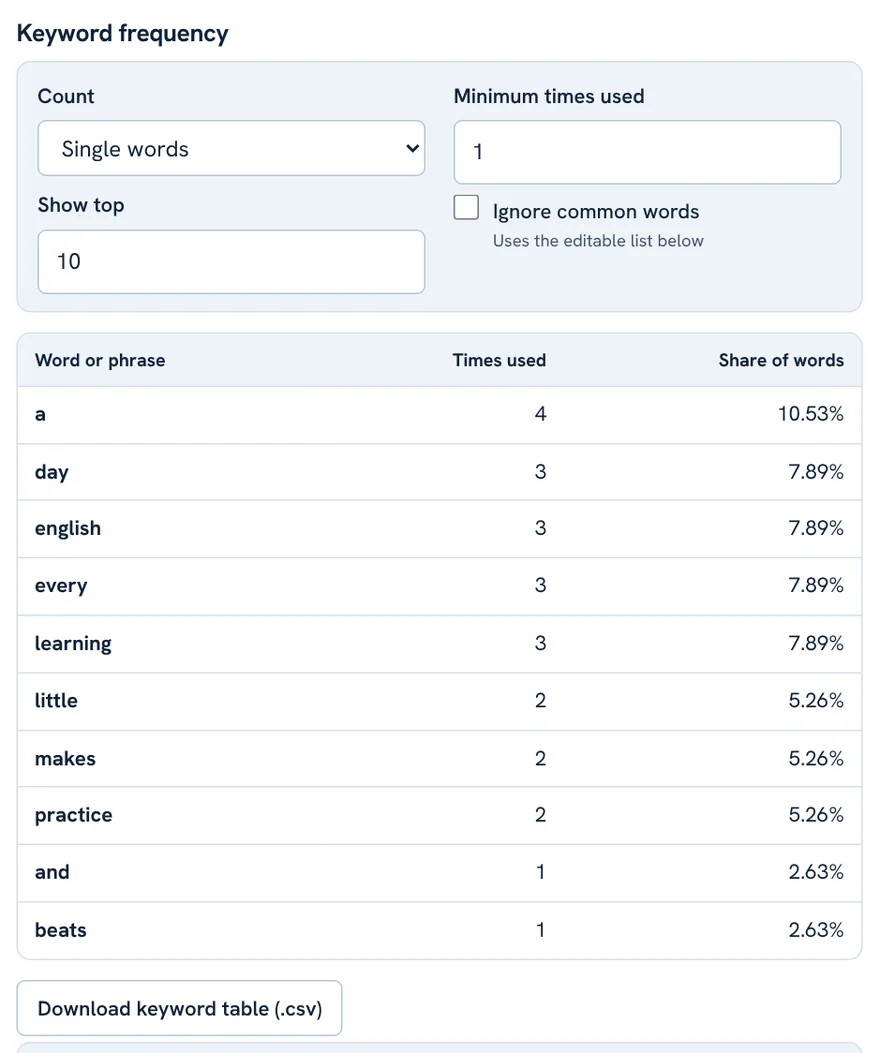
- Word or phrase: the item being counted.
- Times used: how many times it appears.
- Share of words: times used divided by total words, as a percentage.
Press Download keyword table (.csv) to open the table in Excel or Google Sheets.
Settings: Count, Minimum, Top N and Common Words
Four controls decide what the keyword table shows.
- Count: single words, two-word phrases or three-word phrases. Phrases show repeated ideas such as “every day”.
- Minimum times used: hides items used fewer times than this number. Set it to 2 to hide words that appear only once.
- Show top: how many rows to show.
- Ignore common words: skips small words such as the, and and of, so your real topic words rise to the top.
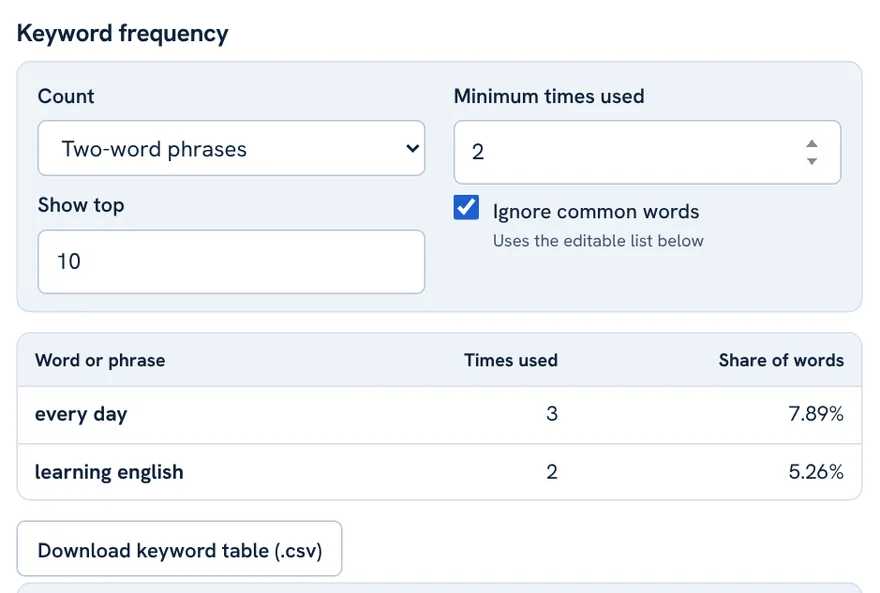
With two-word phrases, a minimum of 2 and common words ignored, the example text shows “every day” three times and “learning english” twice. That is exactly the repetition you would want to notice.
Edit the ignored words list
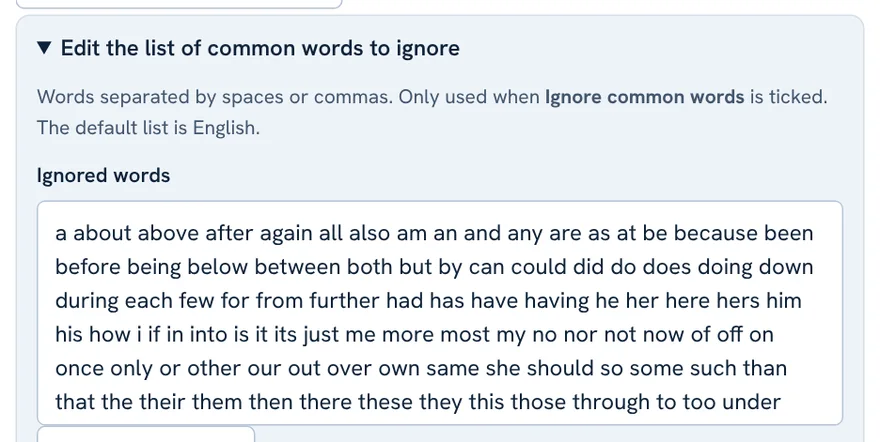
Open Edit the list of common words to ignore to see the list. Separate words with spaces or commas. Add words that are common in your topic, or remove words you want counted. The default list is English.
Using It for Urdu Text
The counter works with Urdu, Arabic, Hindi and other scripts that separate words with spaces. It recognises the Urdu full stop ۔ and question mark ؟ when counting sentences.
Chinese, Japanese and Thai are written without spaces, so word counts for those languages are not reliable. Use the character count instead.
Writing Urdu from Roman Urdu? Convert it first with the Roman Urdu Converter, then count the final Urdu text.
Real-Life Uses
- Students: stay within an essay or assignment limit.
- Bloggers and SEO writers: check article length and make sure no keyword is overused.
- Social media: check captions and bios by characters.
- Speakers: estimate how long a speech will take.
- Editors: compare drafts by words and sentences.
Privacy and Limits
Your text is counted in your browser and is not sent to a server. Numbers can differ slightly from other programs because every program defines a “word” a little differently. Sentence counts depend on punctuation, so text with many abbreviations may show extra sentences.
FAQ
How does the word counter count words?
A word is a run of letters, digits and combining marks, optionally joined by an apostrophe or hyphen between letters. Numbers such as 2026 count as words.
Why is my count different from Microsoft Word or Google Docs?
Each program has its own rules for hyphens, slashes, numbers and symbols. Small differences are normal. Leave a small margin when you must meet an exact limit.
How is reading time calculated?
Word count divided by words per minute. The default is 238 words per minute for reading and 150 for speaking, and you can change both.
What does keyword share mean?
It shows how often a word or phrase appears compared with all words in the text. It only measures repetition and is not a ranking score.
Does it work with Urdu?
Yes. It works with Urdu, Arabic, Hindi and other scripts that separate words with spaces, and it recognises ۔ and ؟ as sentence endings.
Is my text uploaded?
No. Everything is calculated in your browser and nothing is sent to a server.
Related tool guides
ورڈ کاؤنٹر متن پیسٹ کرتے ہی بتا دیتا ہے کہ وہ کتنا لمبا ہے، اور PHL Tools کا مفت ورڈ کاؤنٹر اس سے آگے جاتا ہے۔ یہ الفاظ، حروف، جملے، پیراگراف، منفرد الفاظ، پڑھنے اور بولنے کا وقت دکھاتا ہے اور سب سے زیادہ دہرائے گئے الفاظ کی فہرست دیتا ہے۔ اس مکمل گائیڈ میں ہر عدد، ہر آپشن اور ہر بٹن کی وضاحت ہے تاکہ آپ مضمون کی حد پوری کر سکیں، SEO کے لیے درست لمبائی لکھ سکیں اور کسی کی ورڈ کا حد سے زیادہ استعمال نہ کریں۔ یہ انگریزی اور اردو دونوں پر چلتا ہے اور متن براؤزر سے باہر نہیں جاتا۔
What the Word Counter Does
زیادہ تر ورڈ کاؤنٹر صرف ایک عدد دیتے ہیں۔ یہ ٹول آپ کی تحریر کی پوری تصویر ایک جگہ دکھاتا ہے:
- کل اعداد: الفاظ، حروف، بغیر اسپیس حروف، جملے، پیراگراف، لائنیں اور منفرد الفاظ۔
- وقت: متن خاموشی سے پڑھنے اور بلند آواز میں بولنے میں کتنا وقت لگے گا۔
- کی ورڈ فریکوئنسی: کون سے الفاظ، دو لفظی یا تین لفظی فقرے آپ دہراتے ہیں اور وہ متن کا کتنا حصہ ہیں۔
ٹائپ کرتے وقت سب کچھ ساتھ ساتھ بدلتا ہے، اس لیے آپ ایڈٹ کریں اور اعداد بدلتے دیکھیں۔
Step by Step: Count Your Text
- ورڈ کاؤنٹر کھولیں۔
- بڑے خانے میں متن لکھیں یا پیسٹ کریں۔ کلپ بورڈ سے متن لینے کے لیے Paste یا نمونہ دیکھنے کے لیے Try an example بھی دبا سکتے ہیں۔
- خانے کے عین نیچے کل اعداد پڑھیں۔
- اعداد کو متن کی شکل میں رپورٹ یا پیغام میں ڈالنے کے لیے Copy summary دبائیں۔
- دوبارہ شروع کرنے کے لیے Clear all دبائیں۔
اس مثال میں متن میں 38 الفاظ، 226 حروف (188 بغیر اسپیس)، 4 جملے، 2 پیراگراف اور 24 منفرد الفاظ ہیں۔ اسے پڑھنے میں تقریباً 10 سیکنڈ اور بلند آواز میں بولنے میں تقریباً 15 سیکنڈ لگتے ہیں۔
What Each Number Means
| عدد | گنتی کیسے ہوتی ہے |
|---|---|
| Words | حروف، ہندسوں اور جڑنے والے نشانات کا مسلسل سلسلہ۔ حروف کے بیچ اپوسٹروفی یا ہائفن لفظ کو جوڑے رکھتا ہے، اس لیے don’t اور well-known ایک ایک لفظ ہیں۔ اکیلی علامت لفظ نہیں۔ |
| Characters | حروف، ہندسے، رموزِ اوقاف، اسپیس اور لائن بریک۔ ایموجی یا اعراب والا حرف ایک گنا جاتا ہے۔ |
| Characters (no spaces) | وہی گنتی، اسپیس اور لائن بریک کے بغیر۔ میٹا ڈسکرپشن یا SMS جیسی حدوں کے لیے مفید۔ |
| Sentences | وہ متن جو . ! ? … یا اردو ۔ اور ؟ پر ختم ہو، یا لائن بریک پر۔ Dr. جیسا مخفف ایک اضافی جملہ بنا سکتا ہے۔ |
| Paragraphs | کم از کم ایک خالی لائن سے الگ کیے گئے متن کے بلاک۔ |
| Lines | لائن بریک سے الگ ہونے والی ہر لائن۔ |
| Unique words | بڑے چھوٹے حروف کا فرق نظرانداز کرنے کے بعد مختلف الفاظ۔ |
Reading Time and Speaking Time
پڑھنے کا وقت الفاظ کی تعداد کو پڑھنے کی رفتار پر تقسیم کر کے نکلتا ہے۔ ٹول 238 الفاظ فی منٹ سے شروع ہوتا ہے، جو انگریزی خاموشی سے پڑھنے والے بالغوں کی عام اوسط ہے۔ بولنے کا وقت 150 الفاظ فی منٹ پر نکلتا ہے۔
کل اعداد کے نیچے دو مینو سے رفتار بدلیں:
- Reading speed: 180 (آہستہ)، 238 (اوسط) یا 300 (تیز) الفاظ فی منٹ۔
- Speaking speed: 110 (آہستہ)، 150 (اوسط) یا 180 (تیز) الفاظ فی منٹ۔
تقریر کی تیاری کرنے والے بولنے کا وقت دیکھیں۔ جو بلاگر “min read” دکھاتے ہیں وہ پڑھنے کا وقت استعمال کریں۔ رفتار ہر شخص کی مختلف ہوتی ہے، اس لیے نتیجے کو اندازہ سمجھیں۔
Keyword Frequency: Spot Repeated Words
Keyword frequency تک نیچے جائیں تاکہ دیکھ سکیں کون سے الفاظ سب سے زیادہ استعمال ہوئے۔ یہ کسی ایسے لفظ کو پکڑنے کا تیز طریقہ ہے جو آپ نے حد سے زیادہ دہرایا ہو، یا یہ دیکھنے کا کہ مرکزی کی ورڈ قدرتی طور پر آ رہا ہے۔
- Word or phrase: جو چیز گنی جا رہی ہے۔
- Times used: وہ کتنی بار آئی۔
- Share of words: تعداد کو کل الفاظ پر تقسیم کر کے فیصد۔
ٹیبل کو ایکسل یا گوگل شیٹس میں کھولنے کے لیے Download keyword table (.csv) دبائیں۔
Settings: Count, Minimum, Top N and Common Words
چار کنٹرول طے کرتے ہیں کہ کی ورڈ ٹیبل میں کیا نظر آئے۔
- Count: واحد الفاظ، دو لفظی فقرے یا تین لفظی فقرے۔ فقرے “every day” جیسے دہرائے گئے خیالات دکھاتے ہیں۔
- Minimum times used: اس عدد سے کم بار آنے والی چیزیں چھپا دیتا ہے۔ 2 رکھیں تو ایک بار آنے والے الفاظ نہیں دکھتے۔
- Show top: کتنی قطاریں دکھانی ہیں۔
- Ignore common words: the، and، of جیسے چھوٹے الفاظ چھوڑ دیتا ہے تاکہ آپ کے اصل موضوع کے الفاظ اوپر آئیں۔
دو لفظی فقرے، کم از کم 2 اور عام الفاظ نظرانداز کرنے پر مثال کے متن میں “every day” تین بار اور “learning english” دو بار نظر آتا ہے۔ یہی وہ تکرار ہے جو آپ کو پکڑنی چاہیے۔
Edit the Ignored Words List
Edit the list of common words to ignore کھول کر فہرست دیکھیں۔ الفاظ کو اسپیس یا کاما سے الگ کریں۔ اپنے موضوع کے عام الفاظ شامل کریں، یا جو الفاظ گنوانے ہوں انہیں ہٹا دیں۔ ڈیفالٹ فہرست انگریزی کی ہے۔
Using It for Urdu Text
کاؤنٹر اردو، عربی، ہندی اور ان تمام رسم الخط پر چلتا ہے جن میں الفاظ کے درمیان وقفہ ہو۔ جملے گنتے وقت یہ اردو کے ۔ اور ؟ کو پہچانتا ہے۔
چینی، جاپانی اور تھائی بغیر وقفے کے لکھی جاتی ہیں، اس لیے ان کی ورڈ کاؤنٹ قابلِ اعتماد نہیں۔ ان کے لیے حروف کی گنتی دیکھیں۔
رومن اردو سے اردو لکھ رہے ہیں؟ پہلے رومن اردو کنورٹر سے بدلیں، پھر آخری اردو متن گنیں۔
Real-Life Uses
- طلبہ: مضمون یا اسائنمنٹ کی حد میں رہیں۔
- بلاگرز اور SEO لکھاری: آرٹیکل کی لمبائی دیکھیں اور یقینی بنائیں کہ کوئی کی ورڈ حد سے زیادہ نہ ہو۔
- سوشل میڈیا: کیپشن اور بائیو حروف کے حساب سے جانچیں۔
- مقررین: اندازہ لگائیں کہ تقریر میں کتنا وقت لگے گا۔
- ایڈیٹرز: مسودوں کا الفاظ اور جملوں کے لحاظ سے موازنہ کریں۔
Privacy and Limits
آپ کا متن آپ کے براؤزر میں گنا جاتا ہے اور کسی سرور پر نہیں جاتا۔ دوسرے پروگراموں سے اعداد میں معمولی فرق ہو سکتا ہے کیونکہ ہر پروگرام “لفظ” کی تعریف تھوڑی مختلف کرتا ہے۔ جملوں کی گنتی رموزِ اوقاف پر منحصر ہے، اس لیے جس متن میں بہت مخففات ہوں وہاں اضافی جملے دکھ سکتے ہیں۔
FAQ
ورڈ کاؤنٹر الفاظ کیسے گنتا ہے؟
لفظ حروف، ہندسوں اور جڑنے والے نشانات کا مسلسل سلسلہ ہے، جسے حروف کے بیچ اپوسٹروفی یا ہائفن جوڑ سکتا ہے۔ 2026 جیسے نمبر بھی لفظ گنے جاتے ہیں۔
میرا عدد مائیکروسافٹ ورڈ سے مختلف کیوں ہے؟
ہر پروگرام کے ہائفن، سلیش، نمبر اور علامات کے اپنے اصول ہیں، اس لیے معمولی فرق عام ہے۔ بالکل درست حد پوری کرنی ہو تو تھوڑا مارجن رکھیں۔
کیا یہ اردو متن پر چلتا ہے؟
جی ہاں۔ یہ اردو، عربی، ہندی اور وقفے والے دوسرے رسم الخط پر چلتا ہے، اور ۔ اور ؟ کو جملے کا اختتام سمجھتا ہے۔
کیا میرا متن اپلوڈ ہوتا ہے؟
نہیں۔ سب کچھ آپ کے براؤزر میں گنا جاتا ہے اور کوئی چیز سرور پر نہیں جاتی۔