
Sort Lines Alphabetically Online: Complete Line Sorter Guide
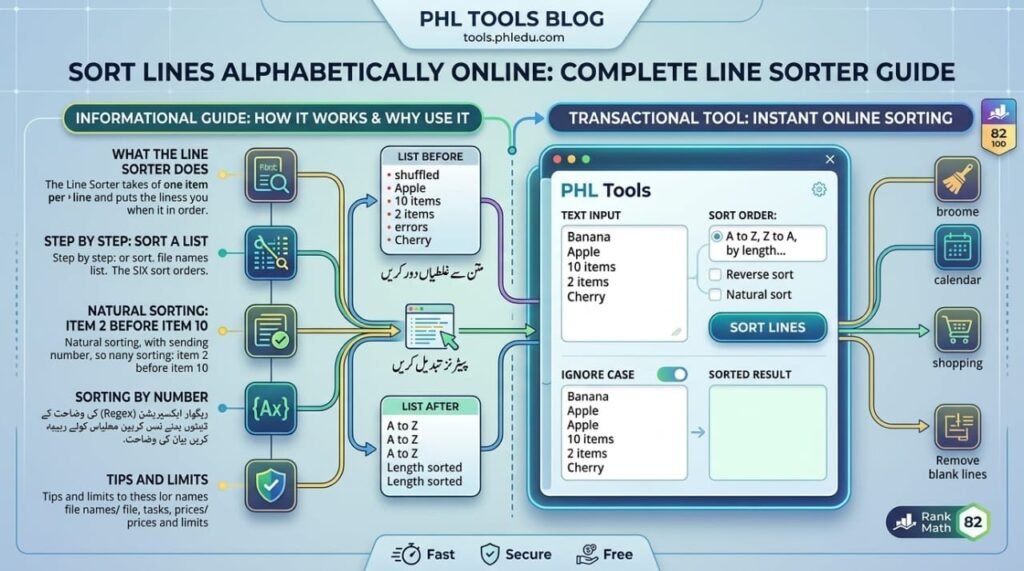
Want to sort lines alphabetically without opening a spreadsheet? Paste your list into the free PHL Tools Line Sorter and choose A to Z, Z to A, shortest or longest first, or sort by the first number on each line. This complete guide explains all six sort orders, natural sorting (so “item 2” comes before “item 10”), case handling, blank lines and the buttons, with real examples. The sort is stable and runs in your browser, so your list is never uploaded.
What the Line Sorter Does
The Line Sorter takes a list with one item per line and puts the lines in the order you choose. It is perfect for names, keywords, file names, tasks, prices and any list that is easier to use when it is in order.
The sort is stable: when two lines count as equal, they keep the order they had. So nothing is shuffled by accident.
Step by Step: Sort a List
- Open the Line Sorter.
- Paste your list into Your lines, one item per line.
- Choose a Sort order. The result appears at once in Sorted lines.
- Adjust the options if you need them: ignore case, natural sorting and blank lines.
- Press Copy result or Download .txt.
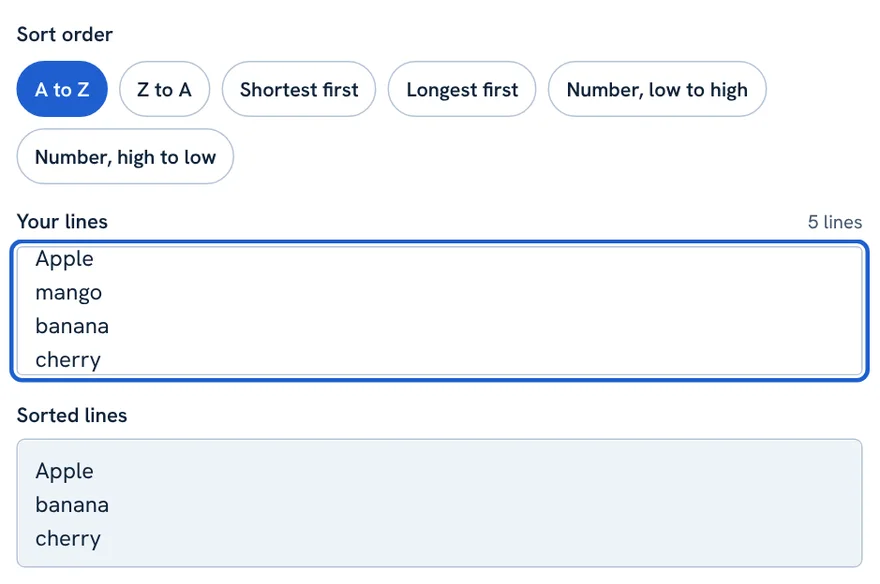
pear
Apple
mango
banana
cherry
Apple
banana
cherry
mango
pear
The Six Sort Orders
| Sort order | What it does | Good for |
|---|---|---|
| A to Z | Alphabetical order | names, keywords, glossaries |
| Z to A | Reverse alphabetical | reverse lists |
| Shortest first | By number of characters, shortest at the top | finding short titles |
| Longest first | By number of characters, longest at the top | finding titles that are too long |
| Number, low to high | By the first number on each line | prices, scores, years |
| Number, high to low | The same, largest first | rankings, top sellers |
Alphabetical order follows your browser’s language rules, so accented letters sit next to their base letters. Length counts characters, not bytes.
Natural Sorting: item 2 Before item 10
A plain alphabetical sort compares text character by character, so chapter 10 comes before chapter 2 because “1” is smaller than “2”. That is rarely what a person wants. Tick Natural sorting and numbers inside text are compared as whole numbers.
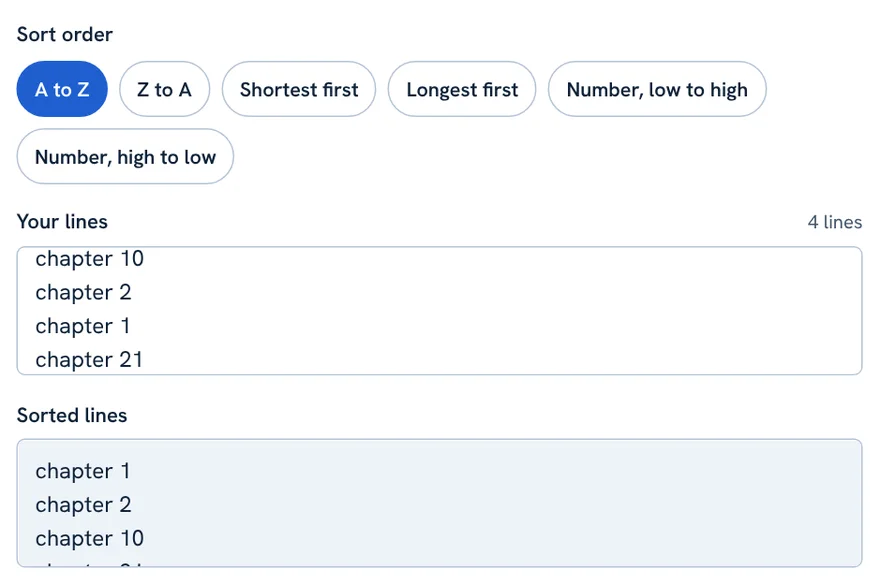
chapter 10
chapter 2
chapter 1
chapter 21
Without natural sorting:
chapter 1
chapter 10
chapter 2
chapter 21

With natural sorting:
chapter 1
chapter 2
chapter 10
chapter 21
Use it for file names, chapters, lesson numbers, episodes and versions.
Sorting by Number
Choose Number, low to high or Number, high to low to sort by the first number found on each line. Commas used as thousands separators are understood, so 1,200 is read as 1200.
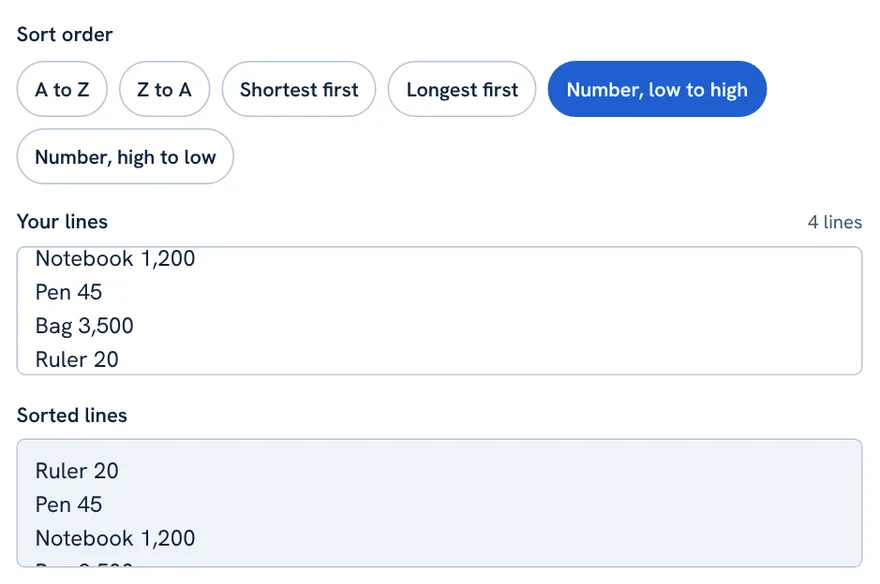
Notebook 1,200
Pen 45
Bag 3,500
Ruler 20
Ruler 20
Pen 45
Notebook 1,200
Bag 3,500
Lines that contain no number are placed after the numbered lines, in alphabetical order.
Sorting by Length
Choose Shortest first or Longest first to sort by the number of characters in each line. This is a quick way to find titles that may be too long for a headline or meta title.
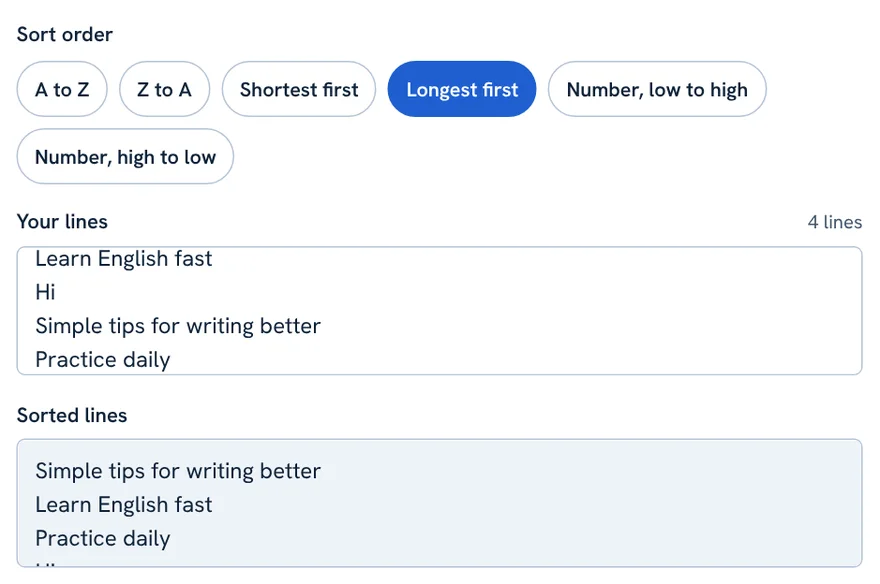
Learn English fast
Hi
Simple tips for writing better
Practice daily
Simple tips for writing better
Learn English fast
Practice daily
Hi
Options: Ignore Case and Blank Lines
- Ignore upper and lower case: on by default. apple and Apple sort together. Untick it to sort capital letters separately. It applies to A to Z and Z to A.
- Natural sorting: off by default. Tick it when your lines contain numbers.
- Blank lines: choose Sort them with the other lines (blank lines go to the top), Remove them, or Move them to the end. Lines containing only spaces count as blank.
The Buttons
- Copy result: copies the sorted list (Ctrl + Enter, or Cmd + Enter on Mac).
- Select result: highlights the output.
- Download .txt: saves the list as a text file.
- Use result as input: moves the sorted list into the input so you can sort it again another way, for example by length after sorting A to Z.
- Paste, Try an example and Clear all work as in the other PHL Tools.
Real-Life Uses
- SEO: alphabetise a keyword list after removing repeats with the Duplicate Line Remover.
- Students and teachers: order name lists and vocabulary lists.
- Shops: sort items by price.
- Writers: find the longest and shortest titles in a content plan.
Tips and Limits
- Use one item per line. Comma-separated lists must be split into lines first.
- Different browsers can order unusual characters slightly differently, including some Urdu characters, so check important lists.
- Your list stays in your browser and is not uploaded.
FAQ
How do I sort lines alphabetically online?
Paste your list with one item per line, choose A to Z and copy the sorted list from the result box.
What is natural sorting?
It reads numbers inside text as whole numbers, so item 2 comes before item 10 instead of after it.
Does capitalisation change the order?
Not by default, because Ignore upper and lower case is on. Untick it to sort capital letters separately.
What happens to blank lines?
You choose: sort them with other lines (they go to the top), remove them, or move them to the end.
Is the sort stable?
Yes. Lines that compare as equal keep the order they had.
Related tool guides
کیا آپ اسپریڈ شیٹ کھولے بغیر لائنوں کو حروفِ تہجی کے مطابق ترتیب دینا چاہتے ہیں؟ فہرست PHL Tools کے مفت لائن سورٹر میں پیسٹ کریں اور A سے Z، Z سے A، چھوٹی یا لمبی لائن پہلے، یا ہر لائن کے پہلے نمبر کے مطابق ترتیب چنیں۔ اس مکمل گائیڈ میں چھ ترتیبیں، نیچرل سورٹنگ (تاکہ “item 2” “item 10” سے پہلے آئے)، کیس کا معاملہ، خالی لائنیں اور بٹن حقیقی مثالوں کے ساتھ سمجھائے گئے ہیں۔ ترتیب مستحکم ہے اور براؤزر میں چلتی ہے، اس لیے فہرست اپلوڈ نہیں ہوتی۔
What the Line Sorter Does
لائن سورٹر ایک آئٹم فی لائن والی فہرست لیتا ہے اور لائنوں کو آپ کی چنی ہوئی ترتیب میں رکھ دیتا ہے۔ یہ ناموں، کی ورڈز، فائل کے ناموں، کاموں، قیمتوں اور ہر اس فہرست کے لیے بہترین ہے جو ترتیب میں ہو تو استعمال آسان ہوتی ہے۔
ترتیب مستحکم ہے: جب دو لائنیں برابر شمار ہوں تو وہ اپنی پہلے والی ترتیب رکھتی ہیں۔ یوں کچھ غلطی سے بکھرتا نہیں۔
Step by Step: Sort a List
- لائن سورٹر کھولیں۔
- فہرست Your lines میں پیسٹ کریں، ایک آئٹم فی لائن۔
- Sort order چنیں۔ نتیجہ Sorted lines میں فوراً آ جاتا ہے۔
- ضرورت ہو تو آپشنز بدلیں: کیس نظرانداز، نیچرل سورٹنگ اور خالی لائنیں۔
- Copy result یا Download .txt دبائیں۔
pear
Apple
mango
banana
cherry
Apple
banana
cherry
mango
pear
The Six Sort Orders
| ترتیب | کیا کرتی ہے | کس کے لیے اچھی |
|---|---|---|
| A to Z | حروفِ تہجی کے مطابق | نام، کی ورڈز، لغت |
| Z to A | الٹی حروفِ تہجی | فہرست الٹنا |
| Shortest first | حروف کی تعداد کے مطابق، چھوٹی اوپر | چھوٹے ٹائٹل ڈھونڈنا |
| Longest first | حروف کی تعداد کے مطابق، لمبی اوپر | حد سے لمبے ٹائٹل ڈھونڈنا |
| Number, low to high | ہر لائن کے پہلے نمبر کے مطابق | قیمتیں، اسکور، سال |
| Number, high to low | وہی، سب سے بڑا پہلے | رینکنگ، زیادہ بکنے والی چیزیں |
حروفِ تہجی کی ترتیب آپ کے براؤزر کے زبان کے اصولوں پر چلتی ہے، اس لیے اعراب والے حروف اپنے بنیادی حرف کے پاس آتے ہیں۔ لمبائی حروف گنتی ہے، بائٹس نہیں۔
Natural Sorting: item 2 Before item 10
عام حروفِ تہجی کی ترتیب متن کو حرف بہ حرف جانچتی ہے، اس لیے chapter 10 آتا ہے chapter 2 سے پہلے کیونکہ “1” “2” سے چھوٹا ہے۔ یہ شاذ ہی وہ ہے جو انسان چاہتا ہے۔ Natural sorting ٹک کریں تو متن کے اندر کے نمبر پورے نمبر کے طور پر جانچے جاتے ہیں۔
chapter 10
chapter 2
chapter 1
chapter 21
نیچرل سورٹنگ کے بغیر:
chapter 1
chapter 10
chapter 2
chapter 21

نیچرل سورٹنگ کے ساتھ:
chapter 1
chapter 2
chapter 10
chapter 21
فائل کے ناموں، ابواب، سبق نمبروں، اقساط اور ورژنز کے لیے استعمال کریں۔
Sorting by Number
ہر لائن میں ملنے والے پہلے نمبر کے مطابق ترتیب کے لیے Number, low to high یا Number, high to low چنیں۔ ہزاروں کے لیے کاما سمجھا جاتا ہے، یعنی 1,200 کو 1200 پڑھا جاتا ہے۔
Notebook 1,200
Pen 45
Bag 3,500
Ruler 20
Ruler 20
Pen 45
Notebook 1,200
Bag 3,500
جن لائنوں میں نمبر نہ ہو وہ نمبر والی لائنوں کے بعد حروفِ تہجی کی ترتیب میں آتی ہیں۔
Sorting by Length
ہر لائن کے حروف کی تعداد کے مطابق ترتیب کے لیے Shortest first یا Longest first چنیں۔ یہ ایسے ٹائٹل پکڑنے کا تیز طریقہ ہے جو ہیڈ لائن یا میٹا ٹائٹل کے لیے بہت لمبے ہوں۔
Learn English fast
Hi
Simple tips for writing better
Practice daily
Simple tips for writing better
Learn English fast
Practice daily
Hi
Options: Ignore Case and Blank Lines
- Ignore upper and lower case: ڈیفالٹ طور پر آن۔ apple اور Apple ساتھ ترتیب پاتے ہیں۔ بڑے حروف الگ ترتیب دینے کے لیے ٹک ہٹائیں۔ یہ A to Z اور Z to A پر لاگو ہوتا ہے۔
- Natural sorting: ڈیفالٹ طور پر بند۔ لائنوں میں نمبر ہوں تو ٹک کریں۔
- Blank lines: Sort them with the other lines (خالی لائنیں اوپر جاتی ہیں)، Remove them یا Move them to the end چنیں۔ صرف اسپیس والی لائنیں بھی خالی شمار ہوتی ہیں۔
The Buttons
- Copy result: ترتیب شدہ فہرست کاپی کرتا ہے (Ctrl + Enter، میک پر Cmd + Enter)۔
- Select result: آؤٹ پٹ ہائی لائٹ کرتا ہے۔
- Download .txt: فہرست ٹیکسٹ فائل میں محفوظ کرتا ہے۔
- Use result as input: ترتیب شدہ فہرست کو ان پٹ میں لے جاتا ہے تاکہ آپ اسے کسی اور طرح دوبارہ ترتیب دیں، مثلاً A to Z کے بعد لمبائی کے مطابق۔
- Paste، Try an example اور Clear all دوسرے PHL Tools کی طرح کام کرتے ہیں۔
Real-Life Uses
- SEO: ڈپلیکیٹ لائن ریموور سے تکرار ہٹا کر کی ورڈ فہرست کو حروفِ تہجی کی ترتیب دیں۔
- طلبہ اور اساتذہ: ناموں اور ذخیرۂ الفاظ کی فہرستیں ترتیب دیں۔
- دکانیں: چیزوں کو قیمت کے مطابق ترتیب دیں۔
- لکھاری: کنٹینٹ پلان میں سب سے لمبے اور چھوٹے ٹائٹل ڈھونڈیں۔
Tips and Limits
- ایک آئٹم فی لائن رکھیں۔ کاما سے الگ فہرستوں کو پہلے لائنوں میں توڑنا ہوگا۔
- مختلف براؤزر غیر معمولی حروف، بشمول بعض اردو حروف، کو قدرے مختلف ترتیب دے سکتے ہیں، اس لیے اہم فہرستیں جانچ لیں۔
- آپ کی فہرست آپ کے براؤزر میں رہتی ہے اور اپلوڈ نہیں ہوتی۔
FAQ
لائنوں کو آن لائن حروفِ تہجی کی ترتیب کیسے دیں؟
فہرست ایک آئٹم فی لائن پیسٹ کریں، A to Z چنیں اور نتیجے کے خانے سے ترتیب شدہ فہرست کاپی کریں۔
نیچرل سورٹنگ کیا ہے؟
یہ متن کے اندر موجود نمبروں کو پورا نمبر پڑھتی ہے، اس لیے item 2، item 10 سے پہلے آتا ہے۔
کیا بڑے حروف ترتیب بدلتے ہیں؟
ڈیفالٹ طور پر نہیں، کیونکہ Ignore upper and lower case آن ہے۔ بڑے حروف الگ ترتیب دینے کے لیے ٹک ہٹائیں۔
خالی لائنوں کا کیا ہوتا ہے؟
آپ چنتے ہیں: دوسری لائنوں کے ساتھ ترتیب (وہ اوپر جاتی ہیں)، انہیں ہٹانا، یا آخر میں بھیجنا۔
Related tool guides
More tool guides
Roman Urdu to Urdu Converter
Type Roman Urdu, get Urdu script. Click any word to pick another spelling.
Word Counter
Count words, characters, sentences and paragraphs, with reading time and keyword frequency.
Case Converter
Change text to UPPERCASE, lowercase, Title Case, camelCase, snake_case and more.