
Find and Replace Online Guide: Replace Text Safely in Bulk

Find and replace online lets you change a word, a name or a pattern everywhere in your text in one step. The free PHL Tools Find and Replace shows how many matches exist and previews the result before anything changes, and it keeps an undo history if you make a mistake. This complete guide explains Match case, Whole words only, regular expressions, the replace buttons and the safety limits, with clear examples you can copy. Your text stays in your browser.
What Find and Replace Is For
Changing the same word by hand in a long article is slow and easy to get wrong. Find and replace does it in one step: you say what to look for, what to put instead, and the tool does the rest.
What makes this version safe is the preview. You see the match count and the final text before your own text changes, so you never replace blindly.
Step by Step: Your First Replacement
- Open the Find and Replace tool.
- Paste your text into Your text.
- Type the word to look for in Find. The match count appears at once, and the first matches are shown with the text around them.
- Type the new text in Replace with. The box Preview of the result shows what the text will look like. Your own text is not changed yet.
- When the preview looks right, press Replace all in my text.
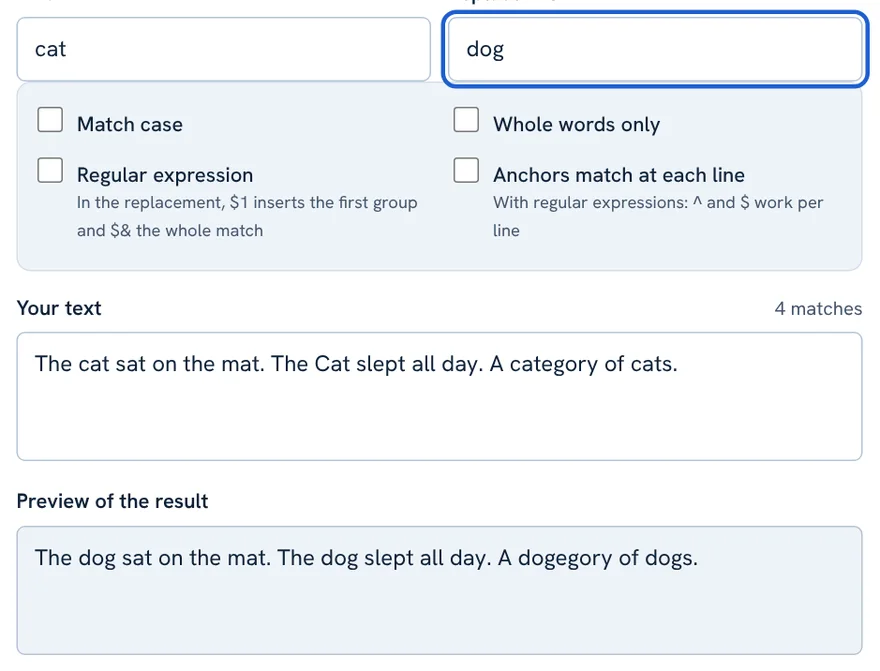
The cat sat on the mat. The Cat slept all day. A category of cats.
Find: cat   Replace with: dog
The dog sat on the mat. The dog slept all day. A dogegory of dogs. (4 matches)
Notice the problem: category became dogegory. The next section shows how to avoid it.
Match Case and Whole Words Only
By default the search ignores capital letters and looks inside words. Two checkboxes change that.
- Match case: Cat and cat are treated as different. Tick it to change only the exact capitalisation you typed.
- Whole words only: the match must not touch other letters, digits or underscores. This protects words like category when you search for cat.
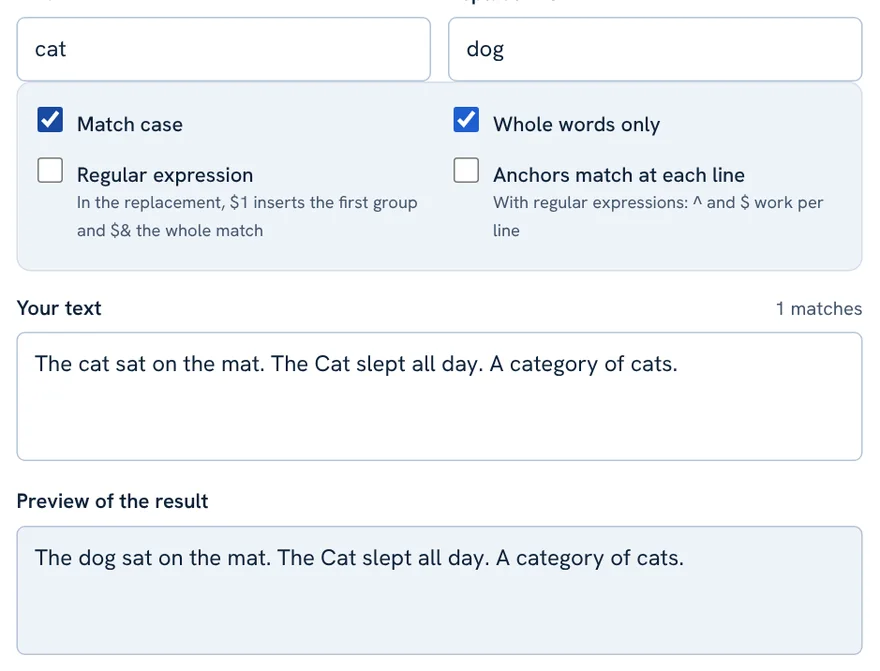
The cat sat on the mat. The Cat slept all day. A category of cats.
Find: cat  (Match case + Whole words only)
The dog sat on the mat. The Cat slept all day. A category of cats. (1 match)
Now only the lowercase standalone word cat changed. The words Cat, category and cats were left alone.
Regular Expressions Made Simple
A regular expression (regex) is a pattern that can match many different texts at once. You do not need it for everyday work, but it is powerful when you do. Tick Regular expression to turn it on.
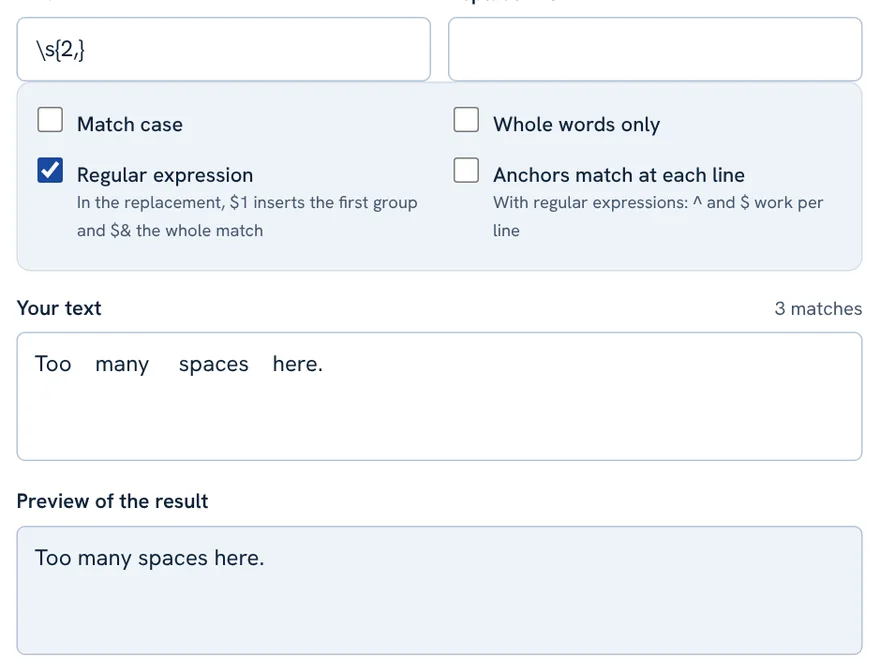
In the picture the pattern \s{2,} means “two or more spaces in a row”, and the replacement is one space. The text “Too many spaces here.” became “Too many spaces here.” with 3 matches.
| Pattern | Meaning | Replace with |
|---|---|---|
\s{2,} | two or more spaces | a single space |
\d+ | one or more digits | (empty) to delete numbers |
(\w+) (\w+) | two words | $2 $1 to swap them |
^\s+ | spaces at the start of a line (tick Anchors) | (empty) to trim |
- $1, $2 in the replacement insert the first and second captured groups. $& inserts the whole match.
- Anchors match at each line: with regular expressions, makes
^and$match the start and end of every line, not only the whole text. - Without the regex option your replacement is inserted exactly as typed, so special characters are safe.
Replace All, Replace First Only and Undo

- Replace all in my text: changes every match and updates your text.
- Replace first match only: changes just the first match. Press it again for the next one.
- Undo last replace: appears after a replacement and steps back. Up to 30 levels are kept.
Then press Copy result or Download .txt to take the final text with you. Paste, Try an example and Clear all work as in the other PHL Tools.
Safety Features
- Time limit: regular expressions run in a background worker and stop after 2 seconds, so a bad pattern cannot freeze your browser.
- Pattern length: patterns are limited to 500 characters.
- Match limit: counting stops at 100,000 matches.
- Not executed as code: your text is never run as code.
Practical Uses
- Replace an old brand name or spelling across a long article.
- Fix a typo you repeated many times.
- Swap old links for new links in an HTML draft.
- Standardise terms, for example “e-mail” to “email”.
- Delete unwanted text by leaving Replace with empty.
- Join PDF lines: pair it with the Text Cleaner.
Tips and Common Mistakes
| Mistake | Better approach |
|---|---|
| Replacing “cat” also changed “category” | Tick Whole words only. |
| Capital letters were not matched | Untick Match case, or search the exact capitalisation. |
| A symbol like . or ? matched everything | Turn off Regular expression to search literally, or escape it with a backslash. |
| Replacing wrongly and losing track | Press Undo last replace. |
| Not sure what will change | Read the preview first; do not replace until it looks right. |
FAQ
Can I preview before replacing?
Yes. The box Preview of the result shows the final text without changing yours. Your text changes only when you press a replace button.
Can I undo a replacement?
Yes. An Undo last replace button appears after you replace, and up to 30 levels are kept.
How do I replace only whole words?
Tick Whole words only. The match then must not touch other letters, digits or underscores.
Is it safe to use regular expressions?
Yes. Patterns run in a background worker, stop after 2 seconds and are limited to 500 characters, so they cannot freeze your browser.
How do I delete text instead of replacing it?
Type the text in Find and leave Replace with empty, then press Replace all in my text.
Related tool guides
فائنڈ اینڈ ریپلیس آن لائن سے آپ کسی لفظ، نام یا پیٹرن کو پورے متن میں ایک ہی قدم میں بدل سکتے ہیں۔ PHL Tools کا مفت فائنڈ اینڈ ریپلیس بتاتا ہے کہ کتنے میچ ہیں اور کچھ بدلنے سے پہلے نتیجے کا پیش منظر دکھاتا ہے، اور غلطی ہو تو Undo کی ہسٹری رکھتا ہے۔ اس مکمل گائیڈ میں Match case، Whole words only، ریگولر ایکسپریشن، ریپلیس بٹن اور حفاظتی حدوں کی صاف مثالوں کے ساتھ وضاحت ہے جنہیں آپ کاپی کر سکتے ہیں۔ آپ کا متن آپ کے براؤزر میں رہتا ہے۔
What Find and Replace Is For
لمبے مضمون میں ایک ہی لفظ ہاتھ سے بدلنا سست اور غلطی کا باعث ہے۔ فائنڈ اینڈ ریپلیس یہی کام ایک قدم میں کر دیتا ہے: آپ بتاتے ہیں کیا ڈھونڈنا ہے اور اس کی جگہ کیا رکھنا ہے، باقی ٹول کرتا ہے۔
اس ٹول کو محفوظ بنانے والی چیز پیش منظر ہے۔ آپ کا اپنا متن بدلنے سے پہلے آپ میچ کی تعداد اور حتمی متن دیکھ لیتے ہیں، اس لیے آنکھیں بند کر کے نہیں بدلنا پڑتا۔
Step by Step: Your First Replacement
- فائنڈ اینڈ ریپلیس ٹول کھولیں۔
- متن Your text میں پیسٹ کریں۔
- Find میں وہ لفظ لکھیں جو ڈھونڈنا ہے۔ میچ کی تعداد فوراً آ جاتی ہے اور پہلے میچ اپنے آس پاس کے متن کے ساتھ دکھائے جاتے ہیں۔
- Replace with میں نیا متن لکھیں۔ Preview of the result خانہ دکھاتا ہے کہ متن کیسا ہوگا۔ آپ کا اپنا متن ابھی نہیں بدلا۔
- پیش منظر ٹھیک لگے تو Replace all in my text دبائیں۔
The cat sat on the mat. The Cat slept all day. A category of cats.
Find: cat   Replace with: dog
The dog sat on the mat. The dog slept all day. A dogegory of dogs. (4 matches)
مسئلہ دیکھیں: category بدل کر dogegory بن گیا۔ اگلا حصہ اسے روکنے کا طریقہ بتاتا ہے۔
Match Case and Whole Words Only
ڈیفالٹ طور پر تلاش بڑے چھوٹے حروف نظرانداز کرتی ہے اور الفاظ کے اندر بھی ڈھونڈتی ہے۔ دو چیک باکس اسے بدلتے ہیں۔
- Match case: Cat اور cat الگ سمجھے جاتے ہیں۔ صرف وہی کیپیٹلائزیشن بدلنے کے لیے جو آپ نے لکھی، اسے ٹک کریں۔
- Whole words only: میچ کسی حرف، ہندسے یا انڈر اسکور کو چھو نہ رہا ہو۔ cat بدلتے وقت یہ category جیسے الفاظ کو بچاتا ہے۔
The cat sat on the mat. The Cat slept all day. A category of cats.
Find: cat  (Match case + Whole words only)
The dog sat on the mat. The Cat slept all day. A category of cats. (1 match)
اب صرف چھوٹے حروف والا اکیلا لفظ cat بدلا۔ Cat، category اور cats کو نہیں چھیڑا گیا۔
Regular Expressions Made Simple
ریگولر ایکسپریشن (regex) ایسا پیٹرن ہے جو ایک ساتھ بہت سے مختلف متن سے میل کھا سکتا ہے۔ روزمرہ کام میں اس کی ضرورت نہیں پڑتی، مگر جب پڑے تو بہت طاقتور ہے۔ آن کرنے کے لیے Regular expression ٹک کریں۔
تصویر میں پیٹرن \s{2,} کا مطلب ہے “مسلسل دو یا زیادہ اسپیس”، اور متبادل ایک اسپیس ہے۔ “Too many spaces here.” بدل کر “Too many spaces here.” بنا، 3 میچ کے ساتھ۔
| پیٹرن | مطلب | متبادل |
|---|---|---|
\s{2,} | دو یا زیادہ اسپیس | ایک اسپیس |
\d+ | ایک یا زیادہ ہندسے | خالی، تاکہ نمبر حذف ہوں |
(\w+) (\w+) | دو الفاظ | $2 $1 تاکہ بدل جائیں |
^\s+ | لائن کے شروع کی اسپیس (Anchors ٹک کریں) | خالی، تاکہ صاف ہو |
- متبادل میں $1، $2 پہلا اور دوسرا پکڑا ہوا گروپ ڈالتے ہیں۔ $& پورا میچ ڈالتا ہے۔
- Anchors match at each line: ریگولر ایکسپریشن کے ساتھ
^اور$کو ہر لائن کے آغاز اور اختتام پر میچ کرواتا ہے، صرف پورے متن پر نہیں۔ - ریگیکس آپشن کے بغیر آپ کا متبادل بالکل ویسا ہی ڈالا جاتا ہے جیسا لکھا، اس لیے خاص علامات محفوظ ہیں۔
Replace All, Replace First Only and Undo
- Replace all in my text: ہر میچ بدلتا ہے اور آپ کا متن اپ ڈیٹ کرتا ہے۔
- Replace first match only: صرف پہلا میچ بدلتا ہے۔ اگلے کے لیے دوبارہ دبائیں۔
- Undo last replace: تبدیلی کے بعد ظاہر ہوتا ہے اور ایک قدم پیچھے جاتا ہے۔ 30 مراحل تک محفوظ رہتے ہیں۔
پھر حتمی متن لینے کے لیے Copy result یا Download .txt دبائیں۔ Paste، Try an example اور Clear all دوسرے PHL Tools کی طرح کام کرتے ہیں۔
Safety Features
- وقت کی حد: ریگولر ایکسپریشن پس منظر کے ورکر میں چلتے ہیں اور 2 سیکنڈ بعد رک جاتے ہیں، اس لیے خراب پیٹرن آپ کا براؤزر نہیں روک سکتا۔
- پیٹرن کی لمبائی: پیٹرن 500 حروف تک محدود ہیں۔
- میچ کی حد: گنتی 100,000 میچ پر رک جاتی ہے۔
- کوڈ کے طور پر نہیں چلتا: آپ کا متن کبھی کوڈ کے طور پر نہیں چلایا جاتا۔
Practical Uses
- لمبے مضمون میں پرانا برانڈ نام یا ہجے بدلیں۔
- بار بار آنے والی غلطی ٹھیک کریں۔
- HTML مسودے میں پرانے لنک نئے لنکس سے بدلیں۔
- اصطلاحات ایک جیسی کریں، مثلاً “e-mail” کو “email”۔
- Replace with خالی چھوڑ کر ناپسندیدہ متن حذف کریں۔
- پی ڈی ایف کی لائنیں جوڑنے کے لیے ٹیکسٹ کلینر کے ساتھ استعمال کریں۔
Tips and Common Mistakes
| غلطی | بہتر طریقہ |
|---|---|
| “cat” بدلنے سے “category” بھی بدل گیا | Whole words only ٹک کریں۔ |
| بڑے حروف والا لفظ میچ نہیں ہوا | Match case کا ٹک ہٹائیں، یا درست کیپیٹلائزیشن لکھیں۔ |
| . یا ? جیسی علامت نے سب کچھ میچ کر لیا | Regular expression بند کر کے لفظ بہ لفظ تلاش کریں، یا اس سے پہلے بیک سلیش لگائیں۔ |
| غلط بدل کر ٹریک کھو دیا | Undo last replace دبائیں۔ |
| پتا نہیں کیا بدلے گا | پہلے پیش منظر پڑھیں؛ ٹھیک لگنے تک نہ بدلیں۔ |
FAQ
کیا بدلنے سے پہلے پیش منظر دیکھ سکتے ہیں؟
جی ہاں۔ Preview of the result خانہ آپ کا متن بدلے بغیر حتمی متن دکھاتا ہے۔ آپ کا متن صرف ریپلیس بٹن دبانے پر بدلتا ہے۔
کیا تبدیلی واپس ہو سکتی ہے؟
جی ہاں۔ بدلنے کے بعد Undo last replace کا بٹن آ جاتا ہے، اور 30 مراحل تک محفوظ رہتے ہیں۔
صرف پورے الفاظ کیسے بدلیں؟
Whole words only ٹک کریں۔ پھر میچ کسی حرف، ہندسے یا انڈر اسکور کو چھو نہیں سکتا۔
متن بدلنے کی جگہ حذف کیسے کروں؟
Find میں متن لکھیں اور Replace with خالی چھوڑیں، پھر Replace all in my text دبائیں۔
Related tool guides
More tool guides
Roman Urdu to Urdu Converter
Type Roman Urdu, get Urdu script. Click any word to pick another spelling.
Word Counter
Count words, characters, sentences and paragraphs, with reading time and keyword frequency.
Case Converter
Change text to UPPERCASE, lowercase, Title Case, camelCase, snake_case and more.