
Roman Urdu to Urdu Converter: Complete Guide
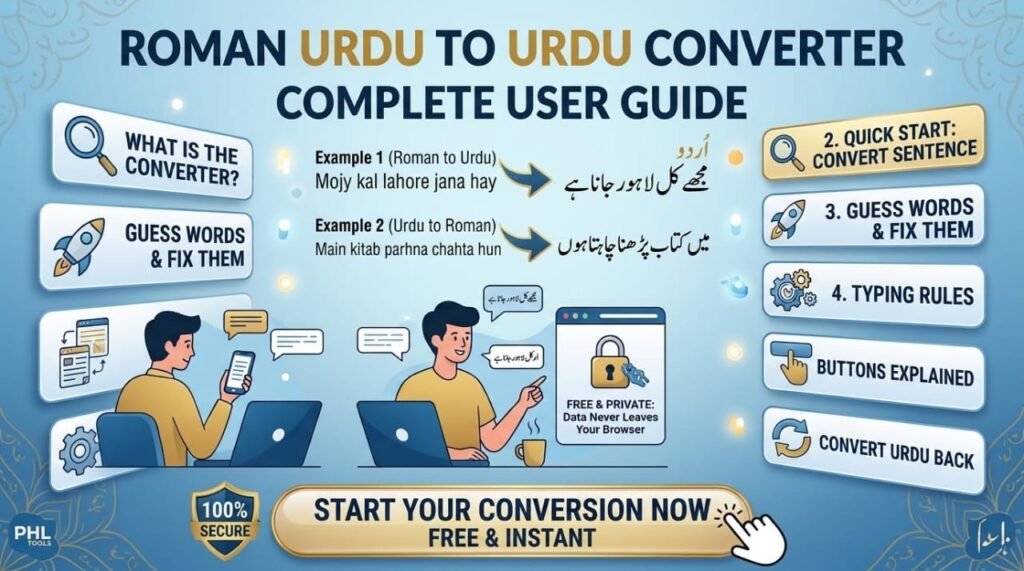
The Roman Urdu to Urdu converter on PHL Tools turns text like “aap kaise hain?” into proper Urdu script (آپ کیسے ہیں؟) while you type. This complete guide explains every part of the tool: how to type for better spelling, how to fix guessed words with one click, what each option and button does, and how to convert Urdu back to Roman Urdu. It is free, needs no sign-up, and your text never leaves your browser.
What Is the Roman Urdu Converter?
Most people in Pakistan and across the diaspora type Urdu with English letters because it is quick on any phone or keyboard. That style is called Roman Urdu. It works for chatting, but it is hard to use in school work, documents, captions and websites, where real Urdu script is expected.
The PHL Tools converter closes that gap. It reads your Roman Urdu and writes the Urdu letters for you. By default it does not use AI or a server. Three simple parts do the work:
- A hand-checked dictionary of about 1,600 common Urdu words, names, places and everyday English loanwords, each with a fixed, correct spelling.
- An Urdu word list of about 22,000 real Urdu words. For a word that is not in the dictionary, the tool looks for the real Urdu word that sounds closest to what you typed, instead of only guessing letters.
- Sound rules for everything else, including common verb endings such as jayenge and karoge.
Because it runs inside your browser, it is fast, free and private. Two optional extras (AI refine with your own key, and voice typing) are explained in their own section below. They are off until you open them.
Quick Start: Convert Your First Sentence
You can finish your first conversion in under ten seconds:
- Open the Roman Urdu Converter.
- Click the top box (Roman Urdu text) and type, for example, mujhe kal lahore jana hai.
- Look at the box below (Urdu text). The Urdu appears as you type, with no button to press.
- Press Copy result and paste the Urdu anywhere: WhatsApp, Word, Google Docs, WordPress or a social post.

mujhe kal lahore jana hai
مجھے کل لاہور جانا ہےGuessed Words and How to Fix Them
This is the most important feature to understand. Roman Urdu has no standard spelling, so no tool can always know which Urdu spelling you mean. PHL Tools solves this by being open about what it knows and what it guessed.
Dictionary words and guessed words
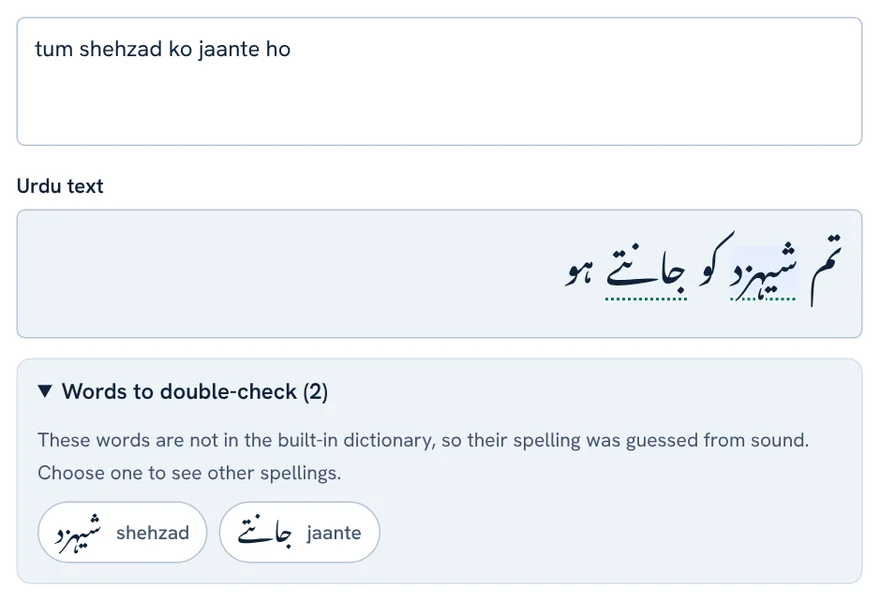
If a word is in the built-in dictionary, it is converted with its correct spelling. If it is not, the tool spells it from the sound and marks it with a dotted underline. Under the output, a status line tells you how many words came from the dictionary and how many were guessed.
Change a spelling in two clicks
- Click an underlined word in the Urdu box. A small chooser shows other possible spellings.
- Pick the one you want. You can also choose to keep the word exactly as you typed it, which is useful for names, links or English words.
Keyboard users can press Enter on a focused underlined word to open the same chooser.
The “Words to double-check” panel
Open this panel under the output to see every guessed word in one list, with its Urdu spelling beside the Roman word. It is the fastest way to proofread a long text: go through the list and fix anything that looks wrong.
Typing Rules for Better Urdu Spelling
A few small habits make the converter far more accurate. Think of them as a tiny spelling system for Roman Urdu.
| Type this | Get this | Example |
|---|---|---|
| aa | long ا or آ | kaam → کام |
| ee | ی | theek → ٹھیک |
| oo | و | poora → پورا |
| kh · gh · sh · ch · zh | خ · غ · ش · چ · ژ | khabar → خبر |
| bh · ph · jh · th · dh | بھ · پھ · جھ · تھ · دھ | bhai → بھائی |
| capital T · D · R inside a word | ٹ · ڈ · ڑ | baRa → بڑا |
For the three retroflex letters ٹ ڈ ڑ, use a capital letter inside the word. Very common words such as bara are already in the dictionary, so you only need this trick for less common words.
Write English words in normal English spelling (mobile, office, email). Links, email addresses and #hashtags are left exactly as typed.
Options: Numbers, Punctuation, Font and Size
Under the Urdu box you will find four display options.
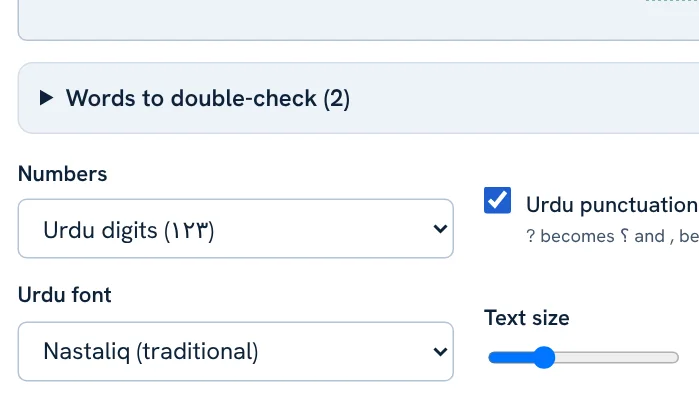
- Numbers: choose Urdu digits (۱۲۳) or Western digits (123). Choose Western digits for phone numbers, prices and anything you will paste into a spreadsheet.
- Urdu punctuation: when ticked, ? becomes ؟ and a comma becomes ،. Untick it if you want to keep English punctuation marks.
- Urdu font: Nastaliq is the traditional hand-written style. Naskh is simpler and easier to read in small sizes.
- Text size: drag the slider to make the Urdu bigger or smaller on screen. This changes only the preview, not the text you copy.
Font and size are display settings. When you paste into another app, that app’s font is used.
Buttons Explained: Copy, Select, Download and More
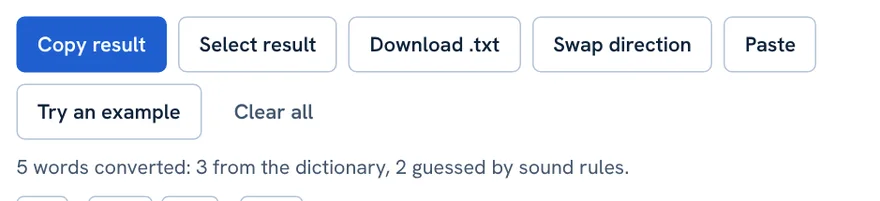
- Copy result: copies the Urdu text. The shortcut is Ctrl + Enter (Cmd + Enter on Mac).
- Select result: highlights the whole output so you can copy it yourself.
- Download .txt: saves the result as a text file in UTF-8, so it opens correctly in Notepad and Word.
- Swap direction: switches between Roman Urdu to Urdu and Urdu to Roman Urdu, and moves your converted text into the input box.
- Paste: pastes from your clipboard into the input box. Your browser may ask for permission.
- Try an example: fills the box with a sample greeting so you can see how the tool behaves.
- Clear all: empties both boxes.
Convert Urdu Back to Roman Urdu
Sometimes you have Urdu script and need it in English letters, for example to share a song title, a name or a short message with someone who cannot read Urdu script.
- Choose Urdu to Roman Urdu at the top, or press Swap direction.
- Paste or type your Urdu in the top box.
- Copy the Roman Urdu from the box below.

This direction is approximate. It is accurate for dictionary words and a rough phonetic reading for the rest, because Urdu script does not show short vowels. Use it as a helpful starting point and fix names by hand.
Common Problems and Quick Fixes
| Problem | Fix |
|---|---|
| A word has the wrong spelling | Click the underlined word and choose another spelling. |
| ٹ ڈ ڑ do not appear | Use a capital T, D or R inside the word, for example baRa. |
| Long vowels look wrong | Write aa, ee and oo for long sounds: paani, theek, poora. |
| Numbers look unusual in my spreadsheet | Set Numbers to Western digits (123). |
| A link or name must stay in English | Click the word and choose to keep it as typed. |
| Urdu looks too small | Move the Text size slider, or switch to Naskh font. |
Large Texts, AI Refine and Voice Typing
Long texts and thousands of lines
You can paste a long document or a list with thousands of lines. The converter handles up to about one million characters in one go, keeps every line break, and normally finishes in a fraction of a second. Very long results are shown as plain text so the page stays fast, and Copy result and Download still give you everything.
Not happy with a result? Use AI refine (optional)
Roman Urdu has no fixed spelling, so no tool is right every time. If you are not satisfied, open the AI refine panel under the output and use your own key from a provider such as Google Gemini, Groq, OpenRouter, Mistral, OpenAI or Anthropic. Many of these offer a free key. The tool sends your text in small batches, checks that every line comes back, and keeps the normal result for any line the AI fails on.
- Your key is yours. It is kept only for the current tab and is saved on your device only if you tick Remember. PHL Tools has no server and never sees it.
- Your text leaves the browser in this mode. It goes straight to the provider you chose, under that provider’s privacy terms. Do not use it for confidential text.
- Free keys have limits. If a provider says “too many requests”, the tool waits and retries, and you can stop at any time.
- AI is better, not perfect. Read the result once before you publish it.
Type with your voice (optional)
Open the Voice typing panel, choose a language (Urdu Pakistan, Urdu India or English) and press start. Your speech is turned into text and can be sent to the converter. It works in Chrome, Edge and Safari, not in Firefox. Your browser sends the audio to its own speech service, so voice typing is not private in the way the rest of the tool is. The microphone is used only on this tool page and only after you allow it.
Privacy, Limits and Honest Notes
- Private by default: conversion happens in your browser. Your text is not uploaded or stored. It leaves your device only if you choose AI refine or voice typing, as explained above.
- No translation: the tool changes the writing system, not the language. It does not translate English to Urdu or fix grammar.
- Not perfect by design: letters such as ع ح ص ض ظ are not visible in Roman spelling, and short vowels are usually not written in Urdu. That is why guessed words are clearly marked.
Always read the Urdu once before publishing, especially names and formal documents.
A Simple Workflow for Bloggers and Students
- Write your draft in Roman Urdu quickly, without worrying about spelling.
- Paste it into the converter and open Words to double-check.
- Fix the underlined words, set digits and punctuation the way you like.
- Copy the result into WordPress, Word or your assignment.
- Use the Word Counter to check the length, and the Slug Generator to make an English URL for your post.
FAQ
How do I convert Roman Urdu to Urdu online?
Open the PHL Tools Roman Urdu Converter, type or paste your text in the top box and the Urdu script appears below it immediately. Press Copy result to use it anywhere.
Why is one word spelled wrongly?
Roman Urdu has no standard spelling, so words that are not in the dictionary are matched against an Urdu word list or guessed from their sound, and unsure words are marked with a dotted underline. Click the word and choose another spelling, or try the optional AI refine panel.
Can it convert thousands of lines at once?
Yes. You can paste up to about one million characters, and every line break is kept. For hard or unusual spellings, use the optional AI refine panel with your own key.
Can I type Urdu by speaking?
Yes, in Chrome, Edge and Safari. Open the Voice typing panel, choose a language and speak. Your browser’s speech service processes the audio, so it is not private. Firefox does not support it.
How do I type ٹ, ڈ and ڑ?
Use a capital letter inside the word: T for ٹ, D for ڈ and R for ڑ. For example, baRa gives بڑا.
Does this converter use AI or send my text to a server?
Not by default. The normal conversion uses a built-in dictionary, an Urdu word list and spelling rules inside your browser, and your text stays on your device. AI refine and voice typing are optional extras. If you use them, your text (or your voice) goes to the provider or speech service you chose.
Can I use the Urdu result in WhatsApp or Microsoft Word?
Yes. The result is standard Unicode Urdu text that works in WhatsApp, Word, Google Docs, WordPress and social media.
Can it convert Urdu script back to Roman Urdu?
Yes. Choose Urdu to Roman Urdu or press Swap direction. This direction is approximate for words outside the dictionary.
Related tool guides
PHL Tools کا رومن اردو سے اردو کنورٹر “aap kaise hain?” جیسے متن کو ٹائپ کرتے ہی درست اردو رسم الخط (آپ کیسے ہیں؟) میں بدل دیتا ہے۔ اس مکمل گائیڈ میں ٹول کے ہر حصے کی وضاحت ہے: بہتر ہجے کے لیے کیسے لکھیں، مشکوک الفاظ ایک کلک سے کیسے ٹھیک کریں، ہر آپشن اور بٹن کیا کرتا ہے، اور اردو کو واپس رومن اردو میں کیسے بدلیں۔ یہ مفت ہے، رجسٹریشن نہیں چاہیے اور آپ کا متن براؤزر سے باہر نہیں جاتا۔
What Is the Roman Urdu Converter?
پاکستان اور بیرونِ ملک رہنے والے اکثر لوگ اردو کو انگریزی حروف میں لکھتے ہیں کیونکہ یہ ہر فون اور کی بورڈ پر آسان ہے۔ اس انداز کو رومن اردو کہتے ہیں۔ چیٹ کے لیے یہ ٹھیک ہے، مگر اسکول کے کام، دستاویزات، کیپشن اور ویب سائٹ کے لیے اصل اردو رسم الخط چاہیے ہوتا ہے۔
PHL Tools کا کنورٹر یہی خلا پُر کرتا ہے۔ یہ آپ کی رومن اردو پڑھ کر اردو حروف لکھ دیتا ہے۔ عام حالت میں اس میں AI یا سرور استعمال نہیں ہوتا۔ تین سادہ چیزیں کام کرتی ہیں:
- ہاتھ سے جانچی ہوئی ڈکشنری: تقریباً 1,600 عام اردو الفاظ، نام، شہر اور روزمرہ انگریزی الفاظ، ہر ایک کے درست ہجے کے ساتھ۔
- اردو الفاظ کی فہرست: تقریباً 22,000 اصل اردو الفاظ۔ جو لفظ ڈکشنری میں نہ ہو، ٹول صرف حروف کا اندازہ نہیں لگاتا بلکہ ایسا اصل اردو لفظ ڈھونڈتا ہے جس کی آواز آپ کے لکھے سے سب سے قریب ہو۔
- آواز کے اصول: باقی تمام الفاظ کے لیے، بشمول jayenge اور karoge جیسے عام فعل کے اختتام۔
چونکہ یہ آپ کے براؤزر میں چلتا ہے، اس لیے تیز، مفت اور محفوظ ہے۔ دو اختیاری سہولتیں (اپنی key سے AI refine اور آواز سے لکھنا) نیچے الگ سیکشن میں بیان ہیں۔ جب تک آپ انہیں نہ کھولیں وہ بند رہتی ہیں۔
Quick Start: Convert Your First Sentence
پہلی تبدیلی دس سیکنڈ سے کم میں ہو جاتی ہے:
- رومن اردو کنورٹر کھولیں۔
- اوپر والے خانے (Roman Urdu text) میں لکھیں، مثلاً mujhe kal lahore jana hai۔
- نیچے والے خانے (Urdu text) کو دیکھیں۔ اردو ٹائپ کرتے ہی بنتی جاتی ہے، کوئی بٹن دبانا نہیں پڑتا۔
- Copy result دبائیں اور اردو کہیں بھی پیسٹ کریں: واٹس ایپ، ورڈ، گوگل ڈاکس، ورڈپریس یا سوشل پوسٹ۔
mujhe kal lahore jana hai
مجھے کل لاہور جانا ہےGuessed Words and How to Fix Them
سمجھنے کے لیے سب سے اہم خصوصیت یہی ہے۔ رومن اردو کا کوئی معیاری ہجے نہیں، اس لیے کوئی ٹول ہر بار نہیں جان سکتا کہ آپ کا مطلب کون سا ہجے ہے۔ PHL Tools اس مسئلے کا حل یوں کرتا ہے کہ وہ صاف بتاتا ہے کہ اسے کیا معلوم تھا اور اس نے کیا اندازہ لگایا۔
Dictionary Words and Guessed Words
اگر لفظ ڈکشنری میں ہو تو درست ہجے کے ساتھ بدلتا ہے۔ اگر نہ ہو تو ٹول آواز سے ہجے بناتا ہے اور اس پر نقطوں والی لکیر لگا دیتا ہے۔ آؤٹ پٹ کے نیچے اسٹیٹس لائن بتاتی ہے کہ کتنے الفاظ ڈکشنری سے آئے اور کتنے اندازاً بنے۔
Change a Spelling in Two Clicks
- اردو خانے میں لکیر والے لفظ پر کلک کریں۔ ایک چھوٹا مینو دوسرے ممکنہ ہجے دکھاتا ہے۔
- اپنا پسندیدہ ہجے چنیں۔ آپ لفظ کو ویسے ہی رکھنے کا انتخاب بھی کر سکتے ہیں جیسا لکھا تھا، جو ناموں، لنکس یا انگریزی الفاظ کے لیے مفید ہے۔
کی بورڈ استعمال کرنے والے فوکس شدہ لفظ پر Enter دبا کر وہی مینو کھول سکتے ہیں۔
The Words to Double-Check Panel
آؤٹ پٹ کے نیچے یہ پینل کھولیں تو تمام اندازاً بنے الفاظ ایک فہرست میں رومن لفظ اور اس کے اردو ہجے کے ساتھ نظر آتے ہیں۔ لمبے متن کی پروف ریڈنگ کا یہ تیز ترین طریقہ ہے: فہرست دیکھیں اور جو غلط لگے اسے ٹھیک کریں۔
Typing Rules for Better Urdu Spelling
چند چھوٹی عادتیں کنورٹر کو کہیں زیادہ درست بنا دیتی ہیں۔ انہیں رومن اردو کا ایک چھوٹا سا ہجے کا نظام سمجھیں۔
| یہ لکھیں | یہ ملے گا | مثال |
|---|---|---|
| aa | لمبا ا یا آ | kaam → کام |
| ee | ی | theek → ٹھیک |
| oo | و | poora → پورا |
| kh · gh · sh · ch · zh | خ · غ · ش · چ · ژ | khabar → خبر |
| bh · ph · jh · th · dh | بھ · پھ · جھ · تھ · دھ | bhai → بھائی |
| لفظ کے اندر بڑا T · D · R | ٹ · ڈ · ڑ | baRa → بڑا |
ٹ، ڈ اور ڑ کے لیے لفظ کے اندر بڑا حرف لکھیں۔ bara جیسے بہت عام الفاظ پہلے ہی ڈکشنری میں ہیں، اس لیے یہ ترکیب کم عام الفاظ کے لیے چاہیے۔
انگریزی الفاظ عام انگریزی ہجے میں لکھیں (mobile، office، email)۔ لنک، ای میل ایڈریس اور #ہیش ٹیگ بالکل ویسے ہی رہتے ہیں جیسے لکھے۔
Options: Numbers, Punctuation, Font and Size
اردو خانے کے نیچے چار ڈسپلے آپشنز ہیں۔
- Numbers: Urdu digits (۱۲۳) یا Western digits (123) چنیں۔ فون نمبر، قیمتوں اور اسپریڈ شیٹ میں جانے والے متن کے لیے Western digits چنیں۔
- Urdu punctuation: ٹک ہو تو ? کی جگہ ؟ اور کاما کی جگہ ، آتا ہے۔ انگریزی علامات رکھنی ہوں تو ٹک ہٹا دیں۔
- Urdu font: Nastaliq روایتی ہاتھ کی لکھائی جیسا انداز ہے۔ Naskh سادہ ہے اور چھوٹے سائز میں پڑھنا آسان۔
- Text size: سلائیڈر کھینچ کر اسکرین پر اردو بڑی یا چھوٹی کریں۔ اس سے صرف پیش منظر بدلتا ہے، کاپی ہونے والا متن نہیں۔
فونٹ اور سائز صرف ڈسپلے سیٹنگز ہیں۔ دوسری ایپ میں پیسٹ کرنے پر اسی ایپ کا فونٹ استعمال ہوتا ہے۔
Buttons Explained: Copy, Select, Download and More
- Copy result: اردو متن کاپی کرتا ہے۔ شارٹ کٹ Ctrl + Enter ہے (میک پر Cmd + Enter)۔
- Select result: پورا آؤٹ پٹ ہائی لائٹ کر دیتا ہے تاکہ آپ خود کاپی کر سکیں۔
- Download .txt: نتیجہ UTF-8 ٹیکسٹ فائل میں محفوظ کرتا ہے، اس لیے نوٹ پیڈ اور ورڈ میں درست کھلتی ہے۔
- Swap direction: رومن اردو سے اردو اور اردو سے رومن اردو کے درمیان سمت بدلتا ہے اور تبدیل شدہ متن کو ان پٹ خانے میں لے جاتا ہے۔
- Paste: کلپ بورڈ سے ان پٹ خانے میں پیسٹ کرتا ہے۔ براؤزر اجازت مانگ سکتا ہے۔
- Try an example: خانے میں نمونے کا سلام بھر دیتا ہے تاکہ آپ ٹول کا رویہ دیکھ سکیں۔
- Clear all: دونوں خانے خالی کر دیتا ہے۔
Convert Urdu Back to Roman Urdu
کبھی آپ کے پاس اردو رسم الخط ہوتا ہے اور آپ کو انگریزی حروف میں چاہیے، مثلاً گانے کا نام، کوئی نام یا مختصر پیغام اس شخص کو بھیجنا جو اردو رسم الخط نہیں پڑھ سکتا۔
- اوپر Urdu to Roman Urdu چنیں، یا Swap direction دبائیں۔
- اوپر والے خانے میں اردو لکھیں یا پیسٹ کریں۔
- نیچے والے خانے سے رومن اردو کاپی کریں۔
یہ سمت اندازاً ہے۔ ڈکشنری کے الفاظ میں درست ہے اور باقی میں آوازی اندازہ، کیونکہ اردو رسم الخط میں چھوٹی حرکات نظر نہیں آتیں۔ اسے مفید آغاز سمجھیں اور نام ہاتھ سے ٹھیک کریں۔
Common Problems and Quick Fixes
| مسئلہ | حل |
|---|---|
| کسی لفظ کے ہجے غلط ہیں | لکیر والے لفظ پر کلک کریں اور دوسرا ہجے چنیں۔ |
| ٹ ڈ ڑ نہیں آ رہے | لفظ کے اندر بڑا T، D یا R لکھیں، مثلاً baRa۔ |
| لمبی آوازیں غلط لگتی ہیں | لمبی آوازوں کے لیے aa، ee اور oo لکھیں: paani، theek، poora۔ |
| اسپریڈ شیٹ میں ہندسے عجیب لگتے ہیں | Numbers کو Western digits (123) پر رکھیں۔ |
| لنک یا نام انگریزی میں رہنا چاہیے | لفظ پر کلک کریں اور اسے جیسا لکھا تھا ویسا رکھنے کا انتخاب کریں۔ |
| اردو چھوٹی لگتی ہے | Text size سلائیڈر بڑھائیں، یا Naskh فونٹ چنیں۔ |
Large Texts, AI Refine and Voice Typing
لمبا متن اور ہزاروں لائنیں
آپ لمبی دستاویز یا ہزاروں لائنوں کی فہرست پیسٹ کر سکتے ہیں۔ کنورٹر ایک بار میں تقریباً دس لاکھ حروف تک سنبھال لیتا ہے، ہر لائن بریک برقرار رکھتا ہے اور عموماً ایک سیکنڈ کے ایک حصے میں فارغ ہو جاتا ہے۔ بہت لمبا نتیجہ سادہ متن کی صورت میں دکھایا جاتا ہے تاکہ صفحہ تیز رہے، جبکہ Copy result اور Download پورا متن دیتے ہیں۔
نتیجہ پسند نہیں آیا؟ AI refine استعمال کریں (اختیاری)
رومن اردو کے ہجے مقرر نہیں، اس لیے کوئی ٹول ہر بار درست نہیں ہو سکتا۔ مطمئن نہ ہوں تو آؤٹ پٹ کے نیچے AI refine پینل کھولیں اور Google Gemini، Groq، OpenRouter، Mistral، OpenAI یا Anthropic جیسے provider کی اپنی key استعمال کریں۔ ان میں سے کئی free key دیتے ہیں۔ ٹول متن چھوٹے حصوں میں بھیجتا ہے، جانچتا ہے کہ ہر لائن واپس آئی، اور جس لائن پر AI ناکام ہو اس کا عام نتیجہ برقرار رکھتا ہے۔
- key آپ کی اپنی ہے۔ وہ صرف موجودہ ٹیب کے لیے رہتی ہے، اور آپ کے ڈیوائس میں اسی وقت محفوظ ہوتی ہے جب آپ Remember پر نشان لگائیں۔ PHL Tools کا کوئی سرور نہیں اور وہ اسے کبھی نہیں دیکھتا۔
- اس موڈ میں متن براؤزر سے باہر جاتا ہے۔ وہ براہِ راست آپ کے چنے ہوئے provider کو جاتا ہے، اسی کی پرائیویسی شرائط کے تحت۔ رازدارانہ متن کے لیے استعمال نہ کریں۔
- free keys کی حد ہوتی ہے۔ provider “too many requests” کہے تو ٹول انتظار کر کے دوبارہ کوشش کرتا ہے، اور آپ کسی بھی وقت روک سکتے ہیں۔
- AI بہتر ہے، کامل نہیں۔ شائع کرنے سے پہلے نتیجہ ایک بار پڑھ لیں۔
آواز سے لکھیں (اختیاری)
Voice typing پینل کھولیں، زبان چنیں (Urdu Pakistan، Urdu India یا English) اور اسٹارٹ دبائیں۔ آپ کی بات متن بن جاتی ہے جسے کنورٹر میں بھیجا جا سکتا ہے۔ یہ Chrome، Edge اور Safari میں چلتا ہے، Firefox میں نہیں۔ آپ کا براؤزر آڈیو اپنی speech سروس کو بھیجتا ہے، اس لیے آواز سے لکھنا باقی ٹول کی طرح پرائیویٹ نہیں ہے۔ مائیک صرف اسی ٹول کے صفحے پر اور آپ کی اجازت کے بعد استعمال ہوتا ہے۔
Privacy, Limits and Honest Notes
- عام حالت میں محفوظ: تبدیلی آپ کے براؤزر میں ہوتی ہے۔ آپ کا متن اپلوڈ یا محفوظ نہیں ہوتا۔ وہ صرف اسی صورت باہر جاتا ہے جب آپ AI refine یا آواز سے لکھنا استعمال کریں، جیسا اوپر بتایا گیا۔
- ترجمہ نہیں: ٹول رسم الخط بدلتا ہے، زبان نہیں۔ یہ انگریزی کا اردو میں ترجمہ یا گرامر کی اصلاح نہیں کرتا۔
- جان بوجھ کر کامل نہیں: ع ح ص ض ظ جیسے حروف رومن ہجے میں نظر نہیں آتے اور اردو میں چھوٹی حرکات عموماً لکھی نہیں جاتیں۔ اسی لیے اندازاً بنے الفاظ صاف نشان زد ہوتے ہیں۔
شائع کرنے سے پہلے ایک بار اردو ضرور پڑھ لیں، خاص طور پر نام اور رسمی دستاویزات۔
A Simple Workflow for Bloggers and Students
- اپنا مسودہ رومن اردو میں تیزی سے لکھیں اور ہجے کی فکر نہ کریں۔
- اسے کنورٹر میں پیسٹ کریں اور Words to double-check کھولیں۔
- لکیر والے الفاظ ٹھیک کریں اور ہندسے اور رموزِ اوقاف اپنی پسند سے رکھیں۔
- نتیجہ ورڈپریس، ورڈ یا اسائنمنٹ میں کاپی کریں۔
- لمبائی جانچنے کے لیے ورڈ کاؤنٹر اور پوسٹ کا انگریزی URL بنانے کے لیے سلگ جنریٹر استعمال کریں۔
FAQ
رومن اردو کو آن لائن اردو میں کیسے بدلیں؟
PHL Tools کا رومن اردو کنورٹر کھولیں، اوپر والے خانے میں متن لکھیں یا پیسٹ کریں، اردو رسم الخط نیچے فوراً آ جاتا ہے۔ استعمال کے لیے Copy result دبائیں۔
ایک لفظ کے ہجے غلط کیوں آئے؟
رومن اردو کا کوئی معیاری ہجے نہیں، اس لیے جو الفاظ ڈکشنری میں نہ ہوں انہیں اردو الفاظ کی فہرست سے ملایا جاتا ہے یا آواز سے اندازاً بنایا جاتا ہے، اور غیر یقینی الفاظ نقطوں والی لکیر سے نشان زد ہوتے ہیں۔ لفظ پر کلک کر کے دوسرا ہجے چنیں یا اختیاری AI refine آزمائیں۔
ٹ، ڈ اور ڑ کیسے لکھیں؟
لفظ کے اندر بڑا حرف لکھیں: ٹ کے لیے T، ڈ کے لیے D اور ڑ کے لیے R۔ مثلاً baRa سے بڑا بنتا ہے۔
کیا نتیجہ واٹس ایپ یا ورڈ میں چلتا ہے؟
جی ہاں۔ نتیجہ معیاری یونی کوڈ اردو متن ہے جو واٹس ایپ، ورڈ، گوگل ڈاکس، ورڈپریس اور سوشل میڈیا پر درست چلتا ہے۔
کیا میرا متن کسی سرور پر جاتا ہے؟
عام حالت میں نہیں۔ کنورٹر آپ کے براؤزر میں ڈکشنری، اردو الفاظ کی فہرست اور اصولوں سے چلتا ہے، اس لیے متن آپ کے آلے ہی پر رہتا ہے۔ AI refine اور آواز سے لکھنا اختیاری ہیں؛ انہیں استعمال کریں تو آپ کا متن (یا آواز) آپ کے چنے ہوئے provider یا speech سروس کو جاتی ہے۔
کیا ہزاروں لائنیں ایک ساتھ بدلی جا سکتی ہیں؟
جی ہاں۔ آپ تقریباً دس لاکھ حروف تک پیسٹ کر سکتے ہیں اور ہر لائن بریک برقرار رہتا ہے۔ مشکل یا غیر معمولی ہجے کے لیے اپنی key کے ساتھ اختیاری AI refine پینل استعمال کریں۔
کیا بول کر اردو لکھی جا سکتی ہے؟
جی ہاں، Chrome، Edge اور Safari میں۔ Voice typing پینل کھولیں، زبان چنیں اور بولیں۔ آڈیو آپ کے براؤزر کی speech سروس پروسیس کرتی ہے، اس لیے یہ پرائیویٹ نہیں۔ Firefox میں یہ سہولت نہیں۔